Jenkins 版本:2.233
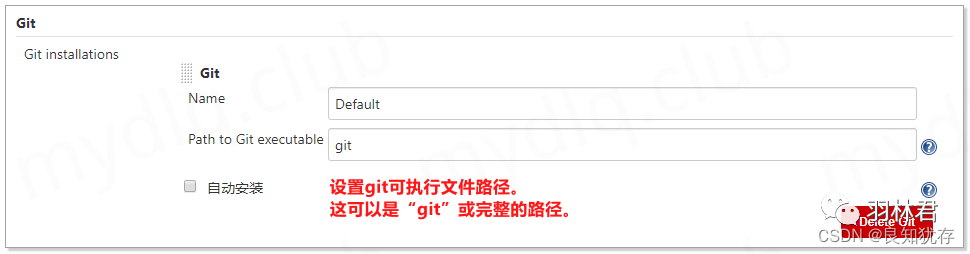
如果是服務(wù)器方式安裝 Jenkins,需要服務(wù)器上線安裝 Git 工具,然后在 "全局工具配置" 中指定 Git 工具地址。
如果是 Docker 鏡像方式安裝 Jnekins,那么 Jenkins 鏡像中已經(jīng)包含 Git 工具,且已經(jīng)配置好環(huán)境,在 "全局工具配置" 中 Git 工具一欄已經(jīng)默認(rèn)配置 Git 工具路徑為 git 了,所以一般不需要配置 Git 相關(guān)設(shè)置。
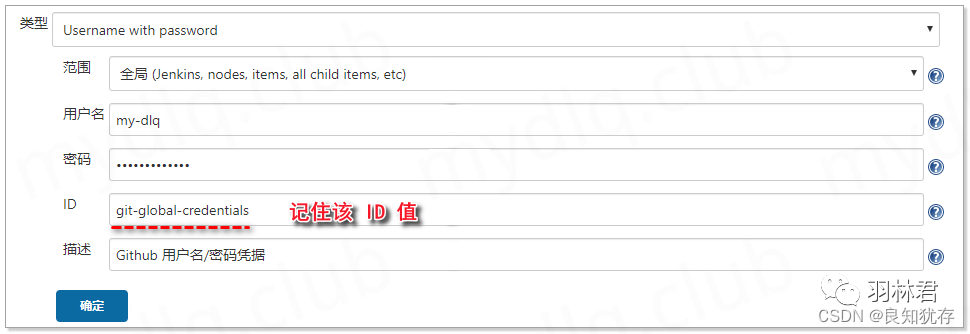
用戶名:?Git 倉庫的用戶名。
密碼:?Git 倉庫的密碼。
ID:?憑據(jù)的ID號,Pipeline 腳本中會使用到該 ID 來讀取用戶名/密碼信息,這里設(shè)置該 ID 為?git-global-credentials,如果不設(shè)置則系統(tǒng)會生成一個隨機(jī) ID 值(不太直觀)。
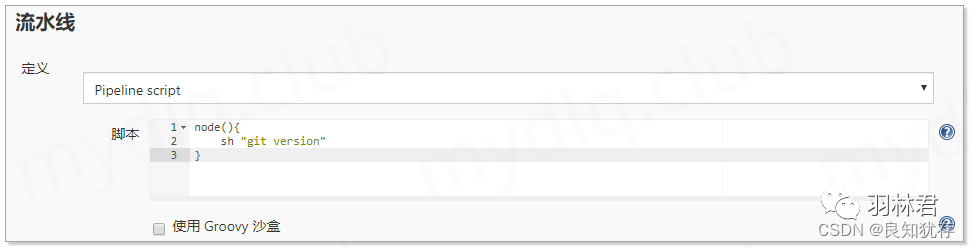
node(){sh "git version"}
Started by user 管理員Running in Durability level: PERFORMANCE_OPTIMIZED[] Start of Pipeline[] nodeRunning on Jenkins in /var/jenkins_home/workspace/git-test[] {[] sh+ git versiongit version 2.11.0[] }[] // node[] End of PipelineFinished: SUCCESS
node:?指定執(zhí)行任務(wù)的節(jié)點(diǎn),如果為空則尋找能夠使用的節(jié)點(diǎn),先從 master 開始,如果設(shè)置了 master 為不可執(zhí)行任務(wù),則使用 slave 節(jié)點(diǎn)。
stage:?設(shè)置腳本當(dāng)前執(zhí)行的階段,相當(dāng)于做標(biāo)記,讓腳本結(jié)構(gòu)更加清晰。
git:?Git 插件提供的方法,只能用于從遠(yuǎn)程 Git 倉庫拉取代碼操作。
url:遠(yuǎn)程倉庫的地址。
branch:指定拉取的遠(yuǎn)程分支。
credentialsId:遠(yuǎn)程 git 倉庫的用戶名/密碼認(rèn)證憑據(jù),這里使用的是上面步驟中配置好的憑據(jù)。
node(){stage("Git 遠(yuǎn)程倉庫拉取"){git url: "https://github.com/my-dlq/test.git",credentialsId: "git-global-credentials",branch: "master"}}
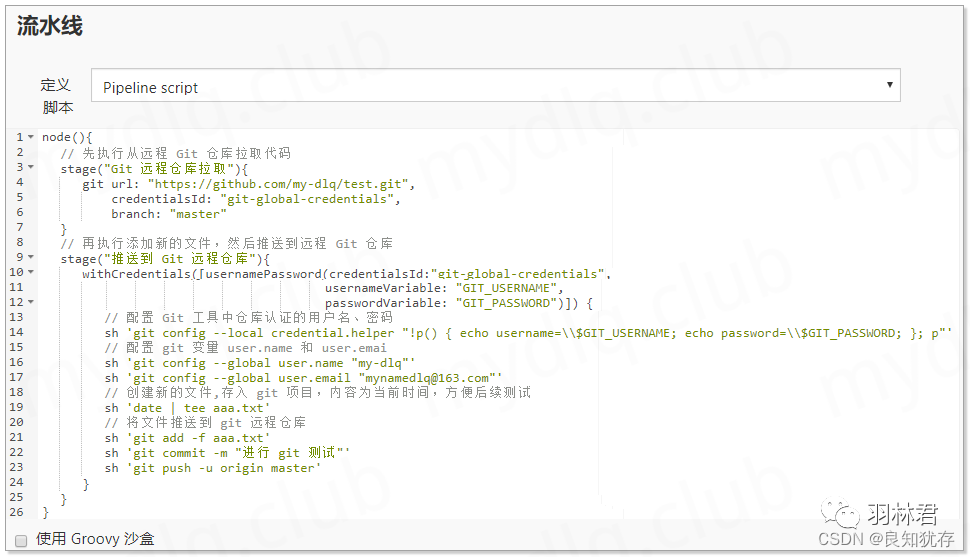
withCredentials:?根據(jù)憑據(jù) ID 引入憑據(jù),然后使用 usernamePassword 策略,將憑據(jù)中的用戶名/密碼信息分別賦予 usernameVariable 與 passwordVariable 兩個變量。
node(){// 先執(zhí)行從遠(yuǎn)程 Git 倉庫拉取代碼stage("Git 遠(yuǎn)程倉庫拉取"){git url: "https://github.com/my-dlq/test.git",credentialsId: "git-global-credentials",branch: "master"}// 再執(zhí)行添加新的文件,然后推送到遠(yuǎn)程 Git 倉庫stage("推送到 Git 遠(yuǎn)程倉庫"){withCredentials([usernamePassword(credentialsId:"git-global-credentials",usernameVariable: "GIT_USERNAME",passwordVariable: "GIT_PASSWORD")]) {// 配置 Git 工具中倉庫認(rèn)證的用戶名、密碼sh 'git config --local credential.helper "!p() { echo username=\\$GIT_USERNAME; echo password=\\$GIT_PASSWORD; }; p"'// 配置 git 變量 user.name 和 user.emaish 'git config --global user.name "my-dlq"'sh 'git config --global user.email "mynamedlq@163.com"'// 創(chuàng)建新的文件,存入 git 項(xiàng)目,內(nèi)容為當(dāng)前時間,方便后續(xù)測試sh 'date | tee aaa.txt'// 將文件推送到 git 遠(yuǎn)程倉庫sh 'git add -f aaa.txt'sh 'git commit -m "進(jìn)行 git 測試"'sh 'git push -u origin master'}}}
Started by user 管理員Running in Durability level: PERFORMANCE_OPTIMIZED[] Start of Pipeline[] nodeRunning on Jenkins in /var/jenkins_home/workspace/git-test[] {[] stage[] { (Git 遠(yuǎn)程倉庫拉取)[] gitusing credential git-global-credentials> git rev-parse --is-inside-work-treeFetching changes from the remote Git repository> git config remote.origin.url https://github.com/my-dlq/test.git # timeout=10Fetching upstream changes from https://github.com/my-dlq/test.git> git --versionusing GIT_ASKPASS to set credentials Github 用戶名/密碼憑據(jù)> git fetch --tags --progress -- https://github.com/my-dlq/test.git +refs/heads/*:refs/remotes/origin/* # timeout=10> git rev-parse refs/remotes/origin/master^{commit}> git rev-parse refs/remotes/origin/origin/master^{commit}Checking out Revision b2bafc3cffb6321a0d088d87f95dc410199a2276 (refs/remotes/origin/master)> git config core.sparsecheckout # timeout=10> git checkout -f b2bafc3cffb6321a0d088d87f95dc410199a2276> git branch -a -v --no-abbrev> git branch -D master> git checkout -b master b2bafc3cffb6321a0d088d87f95dc410199a2276Commit message: "進(jìn)行 git 測試"> git rev-list --no-walk b2bafc3cffb6321a0d088d87f95dc410199a2276[] }[] // stage[] stage[] { (推送到 Git 遠(yuǎn)程倉庫)[] withCredentialsMasking supported pattern matches of $GIT_USERNAME or $GIT_PASSWORD[] {[] sh+ git config --local credential.helper !p() { echo username=$GIT_USERNAME; echo password=$GIT_PASSWORD; }; p[] sh+ git config --global user.name ****[] sh+ git config --global user.email mynamedlq@163.com[] sh+ date+ tee aaa.txtSat Apr 25 16:01:10 UTC 2020[] sh+ git add -f aaa.txt[] sh+ git commit -m 進(jìn)行 git 測試[] 進(jìn)行 git 測試1 file changed, 1 insertion(+), 1 deletion(-)[] sh+ git push -u origin masterTo https://github.com/****/test.gitb2bafc3..a3a9ae2 master -> masterBranch master set up to track remote branch master from origin.[] }[] // withCredentials[] }[] // stage[] }[] // node[] End of PipelineFinished: SUCCESS
來源:http://www.mydlq.club/article/82/
???????????????? END ????????????????