
點擊左上方藍色“一口Linux”,選擇“設為星標”

瑞芯微 | 攝像頭ov13850移植筆記
Camera | 1.Camera基礎知識
Camera | 2.MIPI、CSI基礎
Camera | 3.瑞芯微平臺MIPI攝像頭常用調試命令
Camera | 4.瑞芯微平臺MIPI攝像頭應用程序編寫
Camera | 5.Linux v4l2架構(基于rk3568)
Camera | 6.v4l2拓撲架構(基于rk3568)
Camera | 7.瑞芯微rk3568平臺攝像頭控制器MIPI-CSI驅動架構梳理
本文主要目標是,支持前置攝像頭0v5648、后置攝像頭ov13850,以及移植過程遇到的一些小問題的解決。
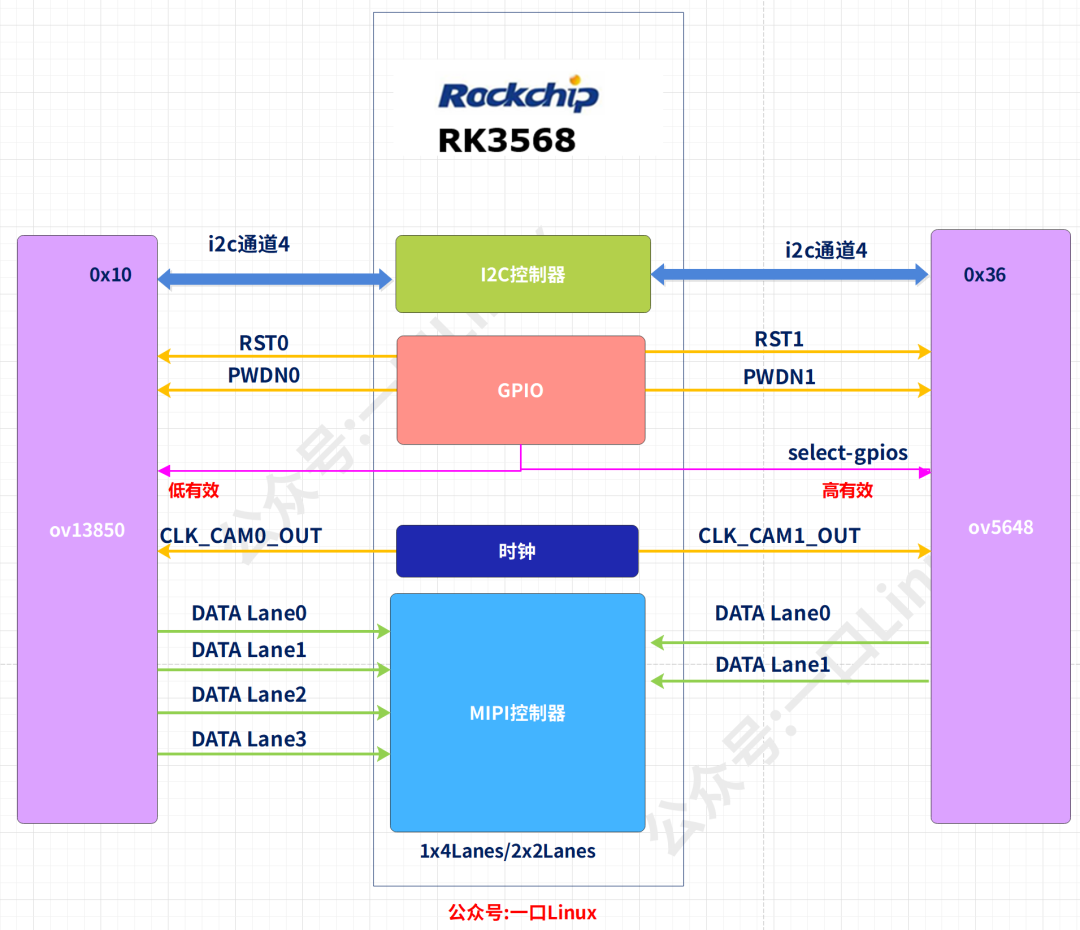
參考上圖,攝像頭詳細信息如下:
根據上述攝像頭硬件信息,設備樹信息如下: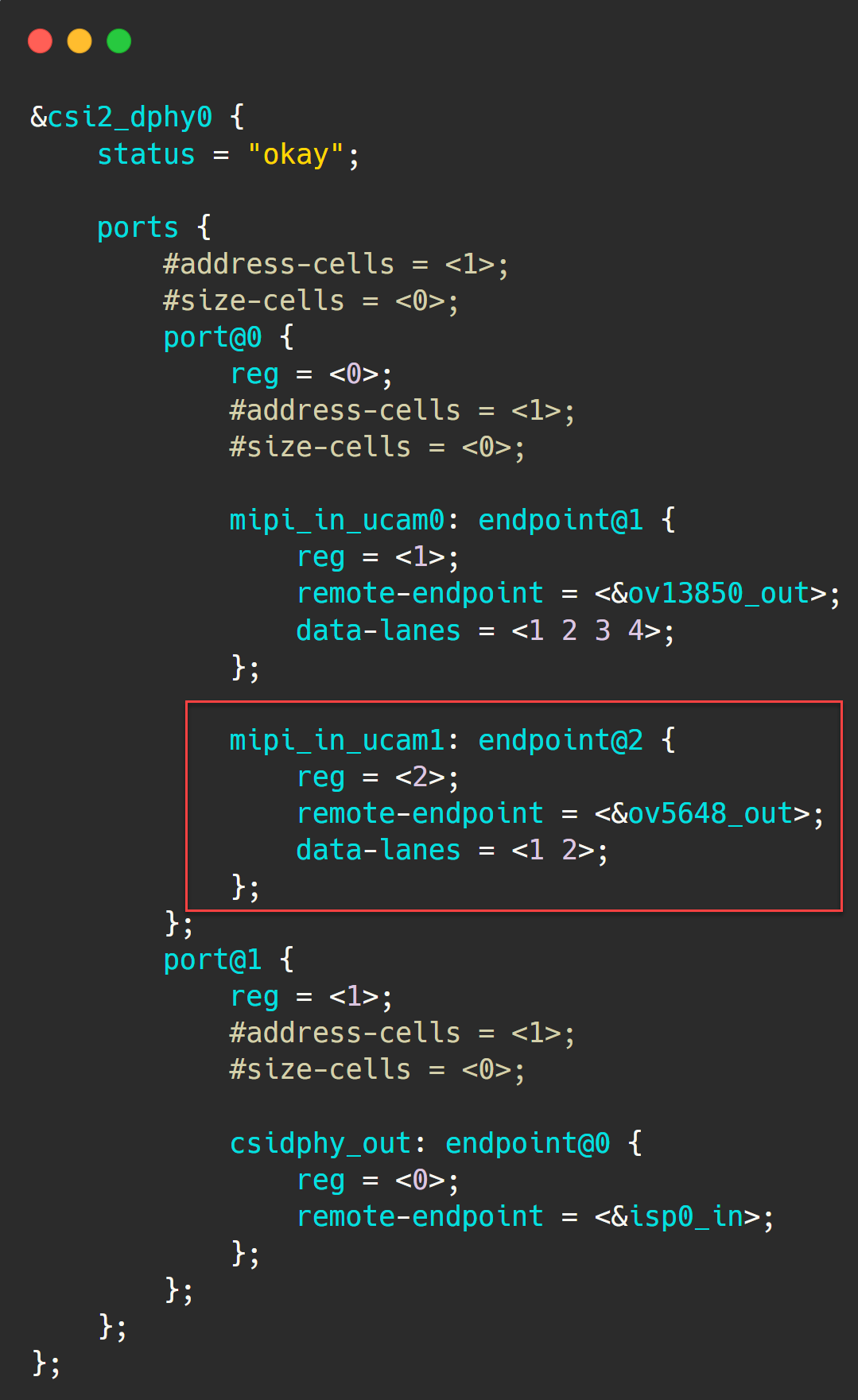
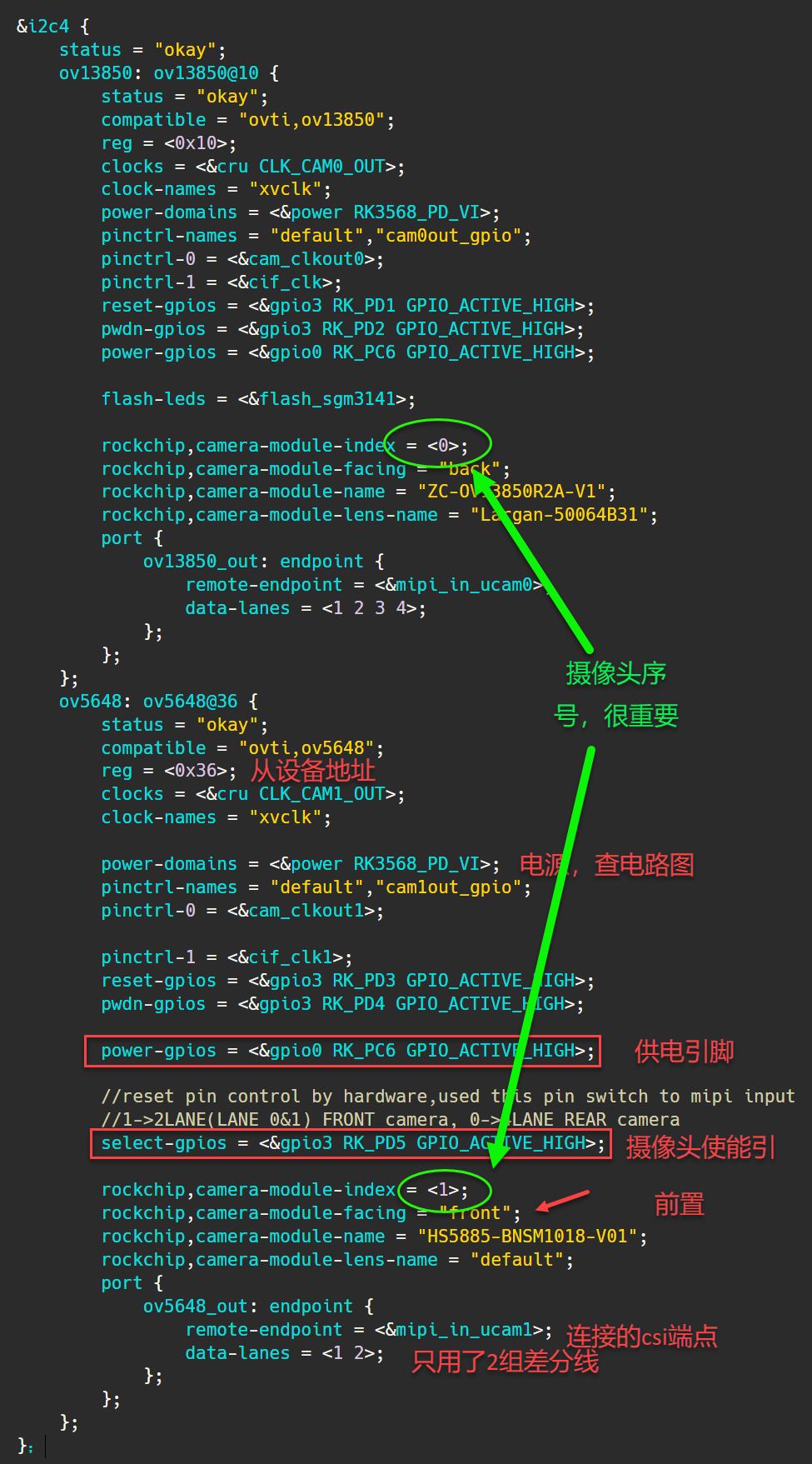
rxw sdk中已經有這兩個攝像頭的驅動,但是需要增加片選的邏輯,
根據前面文章,
《Camera | 4.瑞芯微平臺MIPI攝像頭應用程序編寫》
可知開啟和關閉攝像頭視頻流通過以下命令:
VIDIOC_STREAMON,?VIDIOC_STREAMOFF
對應的回調函數
static?int?ov5648_s_stream(struct?v4l2_subdev?*sd,?int?on)
除此之外,power控制的回調函數
static?int?ov5648_s_power(struct?v4l2_subdev?*sd,?int?on)
我們只需要在這對應的回調函數中增加select-gpio的操作即可。
所有修改代碼如下:
+#include?
+#include?

+static?int?select_gpios;//前置攝像頭使能

static?int?ov5648_s_stream(struct?v4l2_subdev?*sd,?int?on)
{
?……

?if?(on)?{
+???gpio_direction_output(select_gpios,?1);
+???usleep_range(1000,?2000);
???……
?}?else?{
??……
+???gpio_direction_output(select_gpios,?0);
+???usleep_range(1000,?2000);??
?}
?……
}

static?int?ov5648_s_power(struct?v4l2_subdev?*sd,?int?on)
{
?……
?if?(on)?{
+???gpio_direction_output(select_gpios,?1);
+???usleep_range(1000,?2000);
??……
?}?else?{
+???gpio_direction_output(select_gpios,?0);
??……
?}
?……
}

static?void?__ov5648_power_off(struct?ov5648?*ov5648)
{
?int?ret;
?struct?device?*dev?=?&ov5648->client->dev;
+??gpio_direction_output(select_gpios,?0);
?……
}

static?int?ov5648_probe(struct?i2c_client?*client,
?……
+?struct?device_node?*np;
+
+?np?=?dev->of_node;
?
?……

+?select_gpios?=?of_get_named_gpio(np,?"select-gpios",?0);
+
+?ret?=?gpio_request(select_gpios,?"select-gpios");
+?if?(ret?0)?{
+??dev_err(dev,"Failed?to?request?GPIO:%d,?ERRNO:%d",?(s32)?select_gpios,?ret);
+??//return?ret;
+?}
+?printk("ov5648?select_gpios=%d",select_gpios);
?……
加載成功后查看拓撲結構,會有以下entity 信息:
-?entity?70:?m01_f_ov5648?4-0036?(1?pad,?1?link)
?????????????type?V4L2?subdev?subtype?Sensor
?????????????device?node?name?/dev/v4l-subdev3
????????pad0:?Source
????????????????[fmt:SBGGR10/2592x1944]
????????????????->?"rockchip-csi2-dphy0":0?[]

-?entity?74:?m00_b_ov13850?4-0010?(1?pad,?1?link)
?????????????type?V4L2?subdev?subtype?Sensor
?????????????device?node?name?/dev/v4l-subdev4
????????pad0:?Source
????????????????[fmt:SBGGR10/4224x3136]
????????????????->?"rockchip-csi2-dphy0":0?[ENABLED]
說明pipe通路ok。
要讓安卓識別前后置攝像頭,還需要在以下文件增加后置攝像頭ov13850、前置攝像頭ov5684信息
@hardware/rockchip/camera/etc/camera/camera3_profiles.xml
@hardware/rockchip/camera/etc/camera/camera3_profiles_rk356x.xml
在這兩個xml文件中增加這兩個攝像頭信息即可,
一口君是按照其他攝像頭內容修改的,
ov5684因為分辨率問題,需要注意不要超過最大值。
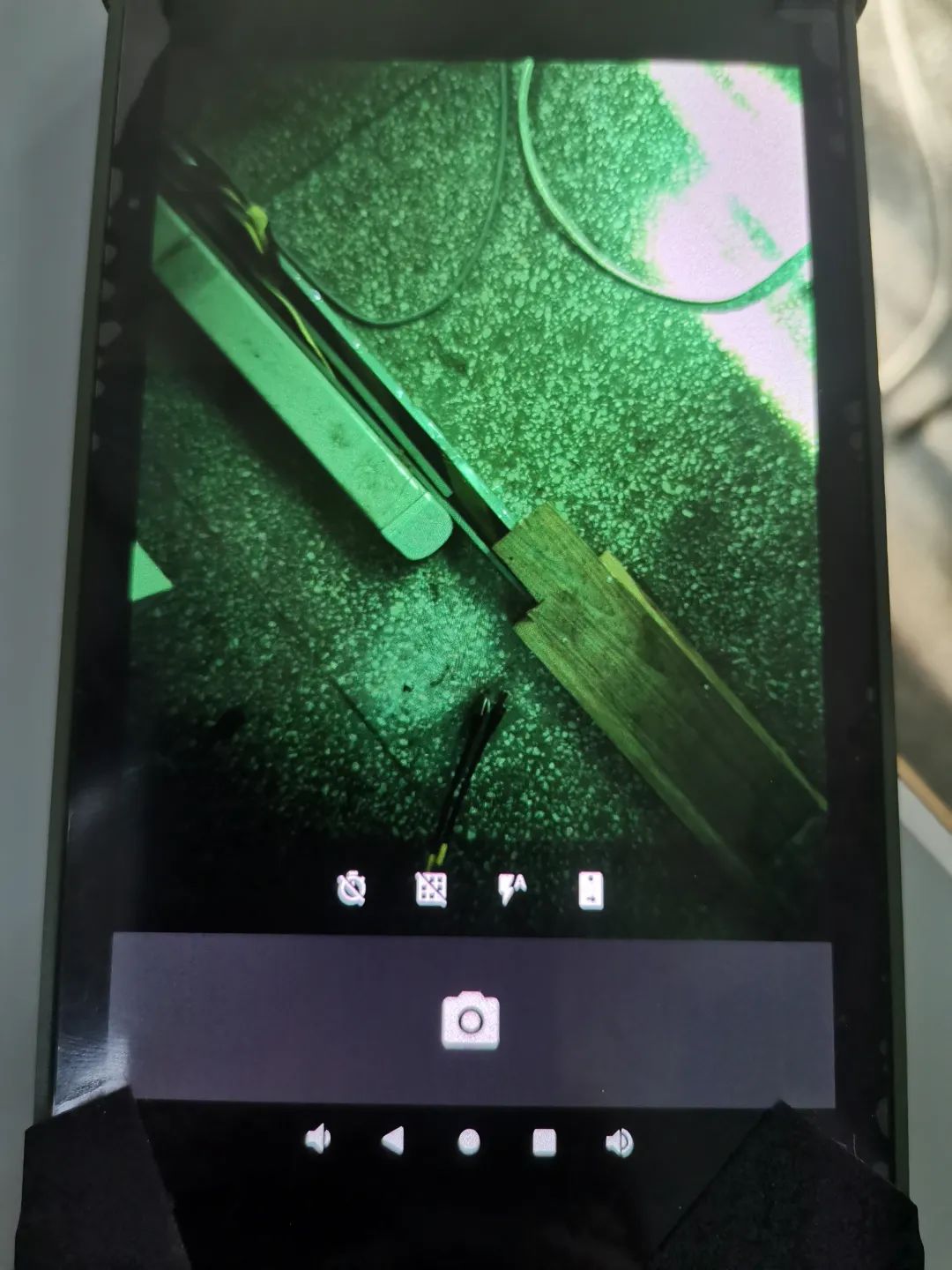
成功后,攝像頭app界面會有切換的按鈕出現
獲取xml文件,可以后臺回復:rxw
開機后用命令抓幀,用的是前置攝像頭
打開app后,界面顯示的是后置攝像頭信息
但是點解界面的切換按鈕,獲取不到前置攝像頭圖像,
在不重啟的情況下要操作后置攝像頭,執行下面操作即可。
Settings->apps¬ifications
SEE?ALL?16?APPS
選擇最近應用??Camera
Storage&cache
????點擊
????clear?storage
?然后退出重新打開攝像頭APP即可
static?int?ov5648_s_stream(struct?v4l2_subdev?*sd,?int?on)
{
?……
?on?=?!!on;

?printk("6902?%s(%d)?enter!?%d\n",?__func__,?__LINE__,on);

?if?(on?==?ov5648->streaming)
??goto?unlock_and_return;

?if?(on)?{
??……
?}?else?{
??……
?}

?ov5648->streaming?=?on;

}
發現切換的時候沒有執行該函數,所以定位是APP測出了問題
03-01?02:40:30.062??1699??1749?I?CAM_Profiler:?[?67.906ms]?GUARD:?CaptureModule.openCameraAndStartPreview()?-?[67.565ms]?mOneCameraOpener.open()
03-01?02:40:30.062??1699??1749?I?CAM_Profiler:?[?67.906ms]?GUARD:?CaptureModule.openCameraAndStartPreview()?-?STOP
03-01?02:40:30.063??1699??1741?E?CAM_OneCamFtrCnfgCrtr:?Unknown?support?level:?0
03-01?02:40:30.063??1699??1741?I?CAM_OneCamCreator:?Camera?support?level:?LIMITED_JPEG
03-01?02:40:30.063??1699??1741?W?CAM_Log?:?Tag?SimpleOneCameraFactory?is?3?chars?longer?than?limit.
03-01?02:40:30.063??1699??1741?I?CAM_OneCamCreator:?Picture?Size?Configuration:?PictureSizeCalculator.Configuration{native?size=3264x2448,?crop=Rect(0,?0?-?3264,?2448)}
03-01?02:40:30.065??1699??1741?D?CAM_CaptureModule:?onCameraOpened:?com.android.camera.one.v2.initialization.GenericOneCameraImpl@200eae9
03-01?02:40:30.065??1699??1741?D?CAM_CaptureModule:?picturesize:3264x2448,previewBuffer:1280x960
03-01?02:40:30.065??1699??1741?D?CAM_CaptureModule:?starting?preview?...
03-01?02:40:30.068??1699??1699?W?CAM_IndicatorIconCtrlr:?Trying?to?sync?a?pano?indicator?that?is?not?initialized.
03-01?02:40:30.068???349???349?W?CameraDeviceClient:?createSurfaceFromGbp:?Camera?1?with?consumer?usage?flag:?256:?Forcing?asynchronous?mode?for?stream
03-01?02:40:30.068???349???349?W?CameraDeviceClient:?createSurfaceFromGbp:?Camera?1:?Overriding?format?0x1?to?IMPLEMENTATION_DEFINED
03-01?02:40:30.069???265???265?D?Camera3HAL:?configure_streams:?streams?list?ptr:?0xf6242dd0,?num?2
????
03-01?02:40:30.070???265??1812?E?RkCamera:??RKISP2GraphConfig:?@selectSensorOutputFormat?:?App?stream?size(3264x2448)?larger?than?Sensor?full?size(2592x1944),?Check?camera3_profiles.xml
????
03-01?02:40:30.070???265??1812?E?RkCamera:??RKISP2GraphConfigManager:?Couldn't?get?mediaCtl?config
03-01?02:40:30.070???265??1812?E?RkCamera:??V4L2Subdev:?queryDvTimings,?ret:-1,?I:0,?wxh:0x0
03-01?02:40:30.070???265??1812?E?RkCamera:??V4L2Subdev:?VIDIOC_SUBDEV_QUERY_DV_TIMINGS?failed:?Inappropriate?ioctl?for?device
03-01?02:40:30.070???265??1812?E?RkCamera:??PlatformData:?Error?queryDvTimings?ret:-2147483648?(/dev/v4l-subdev3)
03-01?02:40:30.070???265??1812?E?RkCamera:??PlatformData:?Error?closing?device?(/dev/v4l-subdev3)
03-01?02:40:30.070???265??1812?E?RkCamera:??RKISP2GraphConfig:?getMediaDevInfo?info.model:rkisp0
03-01?02:40:30.070???265??1812?E?RkCamera:??RKISP2GraphConfigManager:?Couldn't?get?Imgu?mediaCtl?config
03-01?02:40:30.070???265??1812?E?RkCamera:??RKISP2ImguUnit:?Processing?tasks?creation?failed?(ret?=?-2147483648)
03-01?02:40:30.070???265??1812?E?RkCamera:??RKISP2CameraHw:?Unable?to?configure?stream?for?imgunit
03-01?02:40:30.070???265??1812?E?RkCamera:??RequestThread:?Error?configuring?the?streams?@handleConfigureStreams:213
03-01?02:40:30.070???265??1812?E?RkCamera:??RequestThread:?????error?-2147483648?in?handling?message:?3
03-01?02:40:30.071???349???349?E?Camera3-Device:?Camera?1:?configureStreamsLocked:?Set?of?requested?inputs/outputs?not?supported?by?HAL
03-01?02:40:30.071???349???349?E?CameraDeviceClient:?endConfigure:?Camera?1:?Unsupported?set?of?inputs/outputs?provided
03-01?02:40:30.071??1699??1741?W?CameraDevice-JV-1:?Stream?configuration?failed?due?to:?endConfigure:505:?Camera?1:?Unsupported?set?of?inputs/outputs?provided
03-01?02:40:30.072??1699??1741?E?CameraCaptureSession:?Session?0:?Failed?to?create?capture?session ;?configuration?failed
03-01?02:40:30.072??1699??1817?E?CAM_CaptureModule:?Could?not?set?up?preview.
03-01?02:40:30.079??1699??1699?D?CAM_LoggingImageReader:?Closing:?ImageReader{width=3264,?height=2448,?format=JPEG}
03-01?02:40:30.081???349???349?I?Camera3-Device:?disconnectImpl:?E
03-01?02:40:30.088???349???349?I?Camera3-Device:?disconnectImpl:?X
03-01?02:40:30.094???349???349?I?CameraService:?disconnect:?Disconnected?client?for?camera?1?for?PID?1699
其中:
?03-01?02:40:30.070???265??1812?E?RkCamera:??RKISP2GraphConfig:?@selectSensorOutputFormat?:?App?stream?size(3264x2448)?larger?than?Sensor?full?size(2592x1944),?Check?camera3_profiles.xml
提示分辨率不支持,
于是打開camera3_profiles.xml,將所有3264x2448修改為2592x1944
????"5038848"/>??
?"0,0,2592,1944"/>?
?"2592x1944"/>?
?"2592x1944"/>
將下面幾個屬性所有關3264x2448的全部刪除
"BLOB,3264x2448,OUTPUT,
2592*1944*1.5=?5038848
修改xml文件
??"90"/>
?"TRUE"/> end
一口Linux?
關注,回復【1024】海量Linux資料贈送
精彩文章合集
文章推薦


