TableLayout使用表格的方式劃分子組件。

TableLayout的共有XML屬性繼承自:Component。
TableLayout的自有XML屬性見(jiàn)下表:
|
屬性名稱(chēng) |
中文描述 |
取值 |
取值說(shuō)明 |
使用案例 |
|---|---|---|---|---|
|
alignment_type |
對(duì)齊方式 |
align_edges |
表示TableLayout內(nèi)的組件按邊界對(duì)齊。 |
ohos:alignment_type="align_edges" |
|
align_contents |
表示TableLayout內(nèi)的組件按邊距對(duì)齊。 |
ohos:alignment_type="align_contents" |
||
|
column_count |
列數(shù) |
integer類(lèi)型 |
可以直接設(shè)置整型數(shù)值,也可以引用integer資源。 |
ohos:column_count="3" ohos:column_count="$integer:count" |
|
row_count |
行數(shù) |
integer類(lèi)型 |
可以直接設(shè)置整型數(shù)值,也可以引用integer資源。 |
ohos:row_count="2" ohos:row_count="$integer:count" |
|
orientation |
排列方向 |
horizontal |
表示水平方向布局。 |
ohos:orientation="horizontal" |
|
vertical |
表示垂直方向布局。 |
ohos:orientation="vertical" |
</tablelayoutxmlns:ohos="http://schemas.huawei.com/res/ohos"ohos:height="match_parent"ohos:width="match_parent"ohos:background_element="#87CEEB"ohos:padding="</tablelayout
"http://schemas.huawei.com/res/ohos" ohos:shape="rectangle">ohos:radius="5vp"/>ohos:width="1vp"ohos:color="gray"/>ohos:color="#00BFFF"/>"http://schemas.huawei.com/res/ohos"
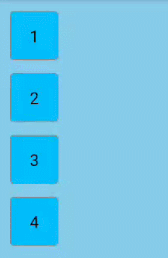
在TableLayout布局中添加子組件。
xmlns:ohos="http://schemas.huawei.com/res/ohos"ohos:height="match_parent"ohos:width="match_parent"ohos:background_element="#87CEEB"ohos:padding="8vp">ohos:height="60vp"ohos:width="60vp"ohos:background_element="$graphic:table_text_bg_element"ohos:margin="8vp"ohos:text="1"ohos:text_alignment="center"ohos:text_size="20fp"/>ohos:height="60vp"ohos:width="60vp"ohos:background_element="$graphic:table_text_bg_element"ohos:margin="8vp"ohos:text="2"ohos:text_alignment="center"ohos:text_size="20fp"/>ohos:height="60vp"ohos:width="60vp"ohos:background_element="$graphic:table_text_bg_element"ohos:margin="8vp"ohos:text="3"ohos:text_alignment="center"ohos:text_size="20fp"/>ohos:height="60vp"ohos:width="60vp"ohos:background_element="$graphic:table_text_bg_element"ohos:margin="8vp"ohos:text="4"ohos:text_alignment="center"ohos:text_size="20fp"/>
TableLayout默認(rèn)一列多行。
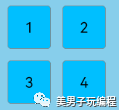
設(shè)置行列數(shù):
...ohos:row_count="2"ohos:column_count="2">
設(shè)置TableLayout的行為2,列為2效果。
在XML中設(shè)置布局排列方向,以“vertical”為例:
...ohos:orientation="vertical">...
設(shè)置布局排列方向?yàn)椤皏ertical”的效果。

TableLayout提供兩種對(duì)齊方式,邊距對(duì)齊“align_contents”、邊界對(duì)齊“align_edges”,默認(rèn)為邊距對(duì)齊“align_contents”。代碼如下:
xmlns:ohos="http://schemas.huawei.com/res/ohos"ohos:height="match_content"ohos:width="match_content"ohos:alignment_type="align_contents"ohos:background_element="$graphic:layout_borderline"ohos:column_count="3"ohos:padding="8vp">ohos:height="48vp"ohos:width="48vp"ohos:background_element="$graphic:table_text_bg_element"ohos:margin="8vp"ohos:padding="8vp"ohos:text="1"ohos:text_alignment="center"ohos:text_size="14fp"/>ohos:height="48vp"ohos:width="48vp"ohos:background_element="$graphic:table_text_bg_element"ohos:margin="16vp"ohos:padding="8vp"ohos:text="2"ohos:text_alignment="center"ohos:text_size="14fp"/>ohos:height="48vp"ohos:width="48vp"ohos:background_element="$graphic:table_text_bg_element"ohos:margin="32vp"ohos:padding="8vp"ohos:text="3"ohos:text_alignment="center"ohos:text_size="14fp"/>ohos:height="48vp"ohos:width="48vp"ohos:background_element="$graphic:table_text_bg_element"ohos:margin="32vp"ohos:padding="8vp"ohos:text="4"ohos:text_alignment="center"ohos:text_size="14fp"/>ohos:height="48vp"ohos:width="48vp"ohos:background_element="$graphic:table_text_bg_element"ohos:margin="16vp"ohos:padding="8vp"ohos:text="5"ohos:text_alignment="center"ohos:text_size="14fp"/>ohos:height="48vp"ohos:width="48vp"ohos:background_element="$graphic:table_text_bg_element"ohos:margin="8vp"ohos:padding="8vp"ohos:text="6"ohos:text_alignment="center"ohos:text_size="14fp"/>
邊距對(duì)齊效果:
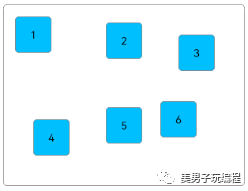
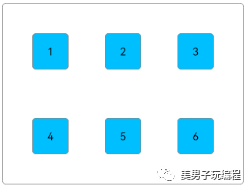
將TableLayout的對(duì)齊方式修改為邊界對(duì)齊。
...????ohos:alignment_type="align_edges">...
邊界對(duì)齊效果:
引用graphic文件夾下的背景資源文件為layout_borderline.xml,示例代碼如下:
"http://schemas.huawei.com/res/ohos" ohos:shape="rectangle">ohos:radius="5vp"/>ohos:width="1vp"ohos:color="gray"/>
TableLayout合并單元格的效果可以通過(guò)設(shè)置子組件的行列屬性來(lái)實(shí)現(xiàn)。
設(shè)置子組件的行列屬性均為2的效果展示:

在XML中創(chuàng)建TableLayout,并添加子組件,代碼如下:
xmlns:ohos="http://schemas.huawei.com/res/ohos"ohos:height="match_content"ohos:width="match_content"ohos:alignment_type="align_edges"ohos:background_element="$graphic:layout_borderline"ohos:column_count="3"ohos:padding="8vp"ohos:row_count="3">ohos:id="$+id:text_one"ohos:height="48vp"ohos:width="48vp"ohos:background_element="$graphic:table_text_bg_element"ohos:margin="16vp"ohos:padding="8vp"ohos:text="1"ohos:text_alignment="center"ohos:text_size="14fp"/>ohos:height="48vp"ohos:width="48vp"ohos:background_element="$graphic:table_text_bg_element"ohos:margin="16vp"ohos:padding="8vp"ohos:text="2"ohos:text_alignment="center"ohos:text_size="14fp"/>ohos:height="48vp"ohos:width="48vp"ohos:background_element="$graphic:table_text_bg_element"ohos:margin="16vp"ohos:padding="8vp"ohos:text="3"ohos:text_alignment="center"ohos:text_size="14fp"/>ohos:height="48vp"ohos:width="48vp"ohos:background_element="$graphic:table_text_bg_element"ohos:margin="16vp"ohos:padding="8vp"ohos:text="4"ohos:text_alignment="center"ohos:text_size="14fp"/>ohos:height="48vp"ohos:width="48vp"ohos:background_element="$graphic:table_text_bg_element"ohos:margin="16vp"ohos:padding="8vp"ohos:text="5"ohos:text_alignment="center"ohos:text_size="14fp"/>ohos:height="48vp"ohos:width="48vp"ohos:background_element="$graphic:table_text_bg_element"ohos:margin="16vp"ohos:padding="8vp"ohos:text="6"ohos:text_alignment="center"ohos:text_size="14fp"/>
在Java代碼中設(shè)置子組件的行列屬性,代碼如下:
protected void onStart(Intent intent) {...Component component = findComponentById(ResourceTable.Id_text_one);TableLayout.LayoutConfig tlc = new TableLayout.LayoutConfig(vp2px(72), vp2px(72));tlc.columnSpec = TableLayout.specification(TableLayout.DEFAULT, 2);tlc.rowSpec = TableLayout.specification(TableLayout.DEFAULT, 2);component.setLayoutConfig(tlc);}private int vp2px(float vp) {return AttrHelper.vp2px(vp, getContext());}
在設(shè)置子組件的行列屬性時(shí),TableLayout剩余的行數(shù)和列數(shù)必須大于等于該子組件所設(shè)置的行數(shù)和列數(shù)。
目前僅支持Java代碼設(shè)置TableLayout子組件的行列屬性。
在創(chuàng)建子組件的行列屬性時(shí),還可設(shè)置子組件的對(duì)齊方式,修改上述Java代碼如下:
protected void onStart(Intent intent) {...tlc.columnSpec = TableLayout.specification(TableLayout.DEFAULT, 2, TableLayout.Alignment.ALIGNMENT_FILL);tlc.rowSpec = TableLayout.specification(TableLayout.DEFAULT, 2, TableLayout.Alignment.ALIGNMENT_FILL);...}
子組件的對(duì)齊方式設(shè)置為ALIGNMENT_FILL的效果:
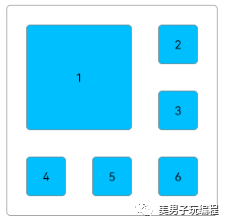
設(shè)置子組件的權(quán)重,代碼如下:
protected void onStart(Intent intent) {...TableLayout.LayoutConfig tlc = new TableLayout.LayoutConfig(0, vp2px(48));tlc.columnSpec = TableLayout.specification(TableLayout.DEFAULT, 1, 1.0f);tlc.rowSpec = TableLayout.specification(TableLayout.DEFAULT, 1);findComponentById(ResourceTable.Id_text_one).setLayoutConfig(tlc);findComponentById(ResourceTable.Id_text_two).setLayoutConfig(tlc);findComponentById(ResourceTable.Id_text_three).setLayoutConfig(tlc);findComponentById(ResourceTable.Id_text_four).setLayoutConfig(tlc);findComponentById(ResourceTable.Id_text_five).setLayoutConfig(tlc);findComponentById(ResourceTable.Id_text_six).setLayoutConfig(tlc);}
上述代碼將子組件的寬度權(quán)重設(shè)置為1.0,每行子組件會(huì)均分TableLayout的寬度,所以需要設(shè)置TableLayout為固定寬度或match_parent。
ohos:width="match_parent"...>ohos:id="$+id:text_one".../>ohos:id="$+id:text_two".../>ohos:id="$+id:text_three".../>ohos:id="$+id:text_four".../>ohos:id="$+id:text_five".../>ohos:id="$+id:text_six".../>
將子組件的寬度權(quán)重設(shè)置為1.0的效果展示:
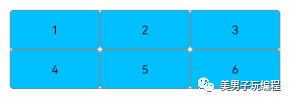
 往期推薦
往期推薦基于Mobile SDK V5版固件開(kāi)發(fā)大疆無(wú)人機(jī)手機(jī)端遙控器(5)
一種高速ADC和DAC轉(zhuǎn)換電路分享
一文搞懂CAN和CAN FD總線協(xié)議
LabVIEW和Arduino的巧妙結(jié)合(基礎(chǔ)篇—1)
LabVIEW設(shè)計(jì)自定義滾動(dòng)條