
前面我們已經實現了控制傳輸并進行了測試,但是每次8字節的SETUP內容都需要手動填入,一般可能記不住需要去翻規格書,所以我們可以優化下UI,實現對于標準請求可以設定提示,根據提示進行設置。我們通過子窗口來實現,需要將子窗口中設置的SETUP返回到主窗口中。以上子窗口和主窗口的信息交互我們通過信號槽來實現。
文件->New File... 按照如下添加Widget類Form
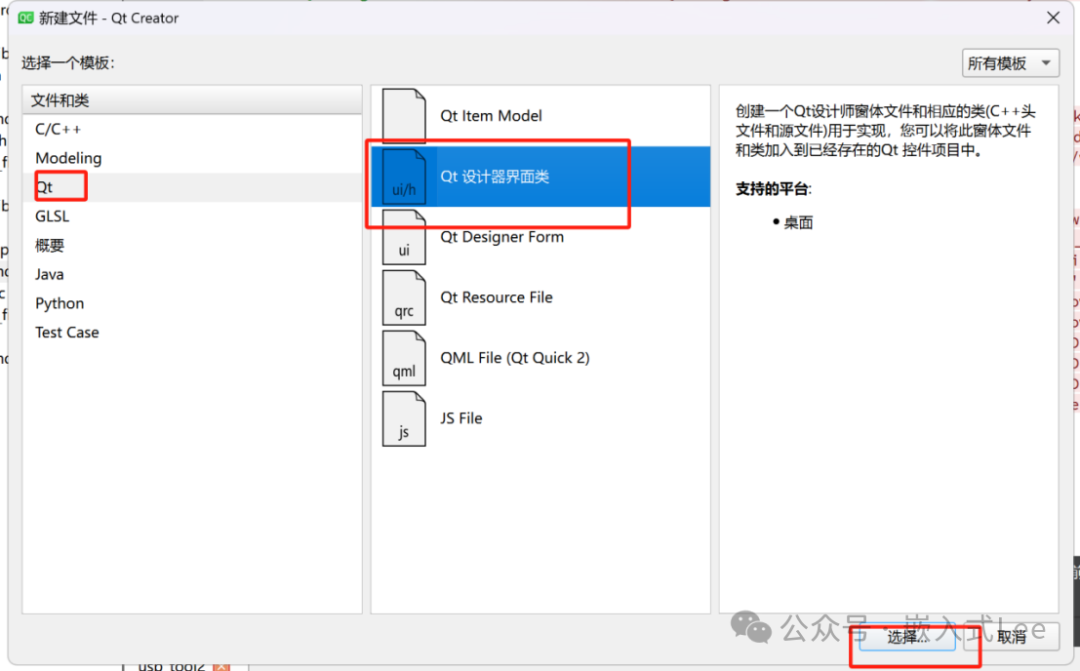
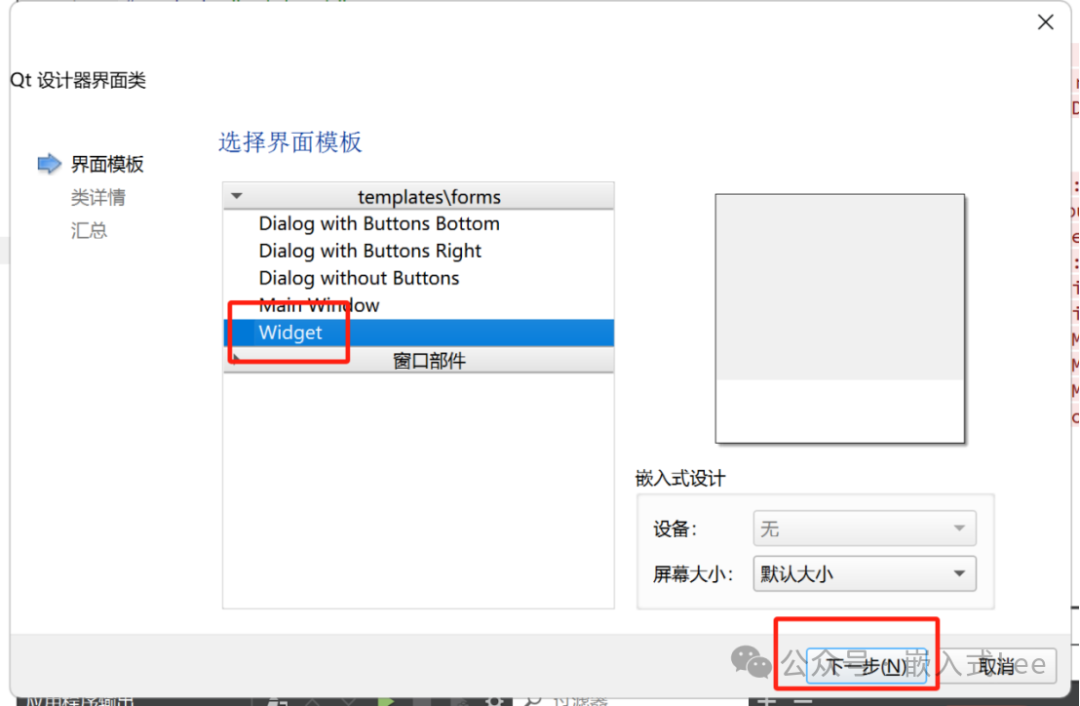
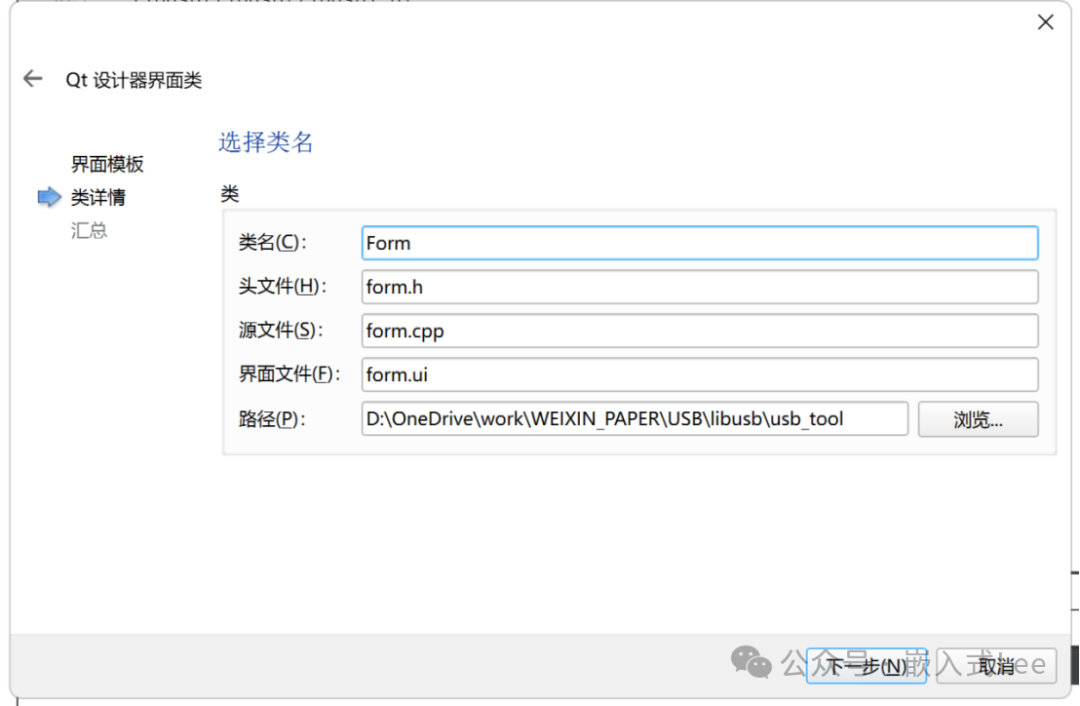
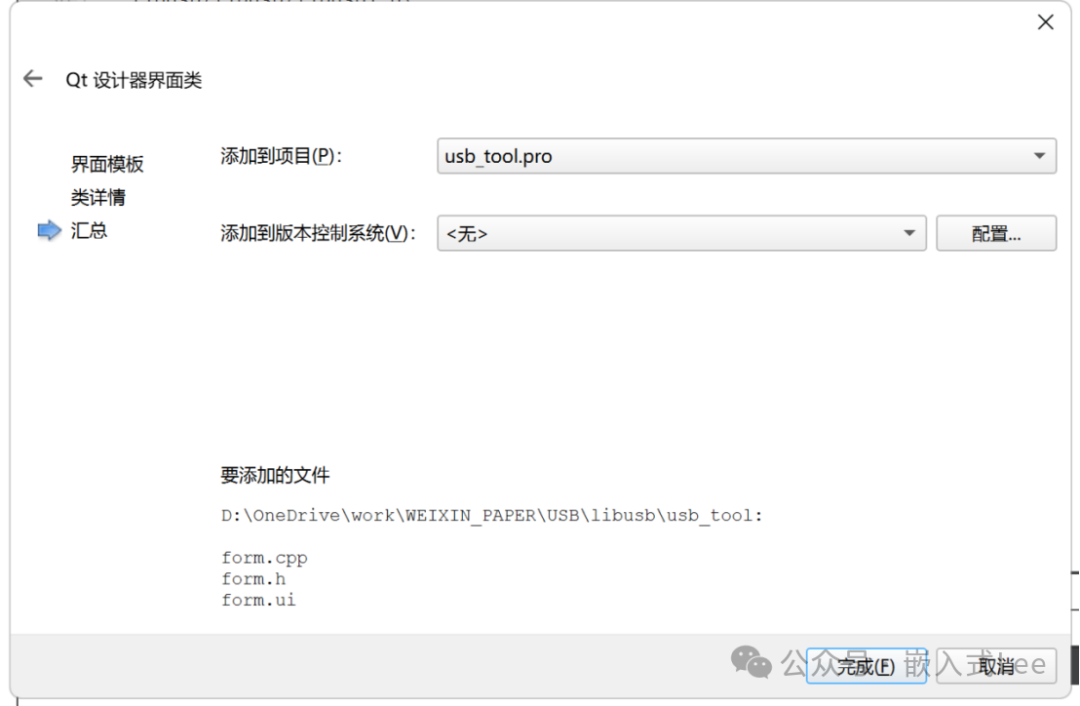
Form.ui設計如下
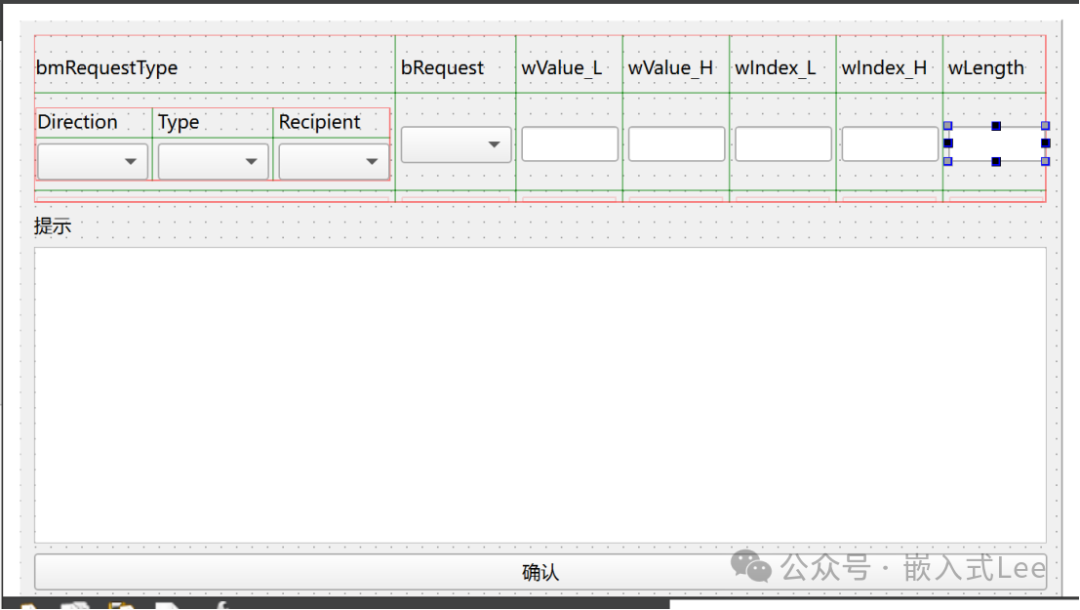
ui文件內容如下
<ui version="4.0"><class>Formclass><widget class="QWidget" name="Form"><property name="geometry"><rect><x>0x><y>0y><width>673width><height>377height>rect>property><property name="windowTitle"><string>Formstring>property><layout class="QVBoxLayout" name="verticalLayout" stretch="10,0,0,0"><item><layout class="QGridLayout" name="gridLayout" rowstretch="1,0,0" columnstretch="3,0,0,0,0,0,0"><item row="1" column="4"><widget class="QLineEdit" name="lineEdit_2"/>item><item row="0" column="6"><widget class="QLabel" name="label_5"><property name="sizePolicy"><sizepolicy hsizetype="Preferred" vsizetype="Fixed"><horstretch>0horstretch><verstretch>0verstretch>sizepolicy>property><property name="text"><string>wLengthstring>property>widget>item><item row="1" column="0"><layout class="QGridLayout" name="gridLayout_2"><item row="0" column="1"><widget class="QLabel" name="label_6"><property name="text"><string>Typestring>property>widget>item><item row="0" column="0"><widget class="QLabel" name="label_7"><property name="text"><string>Directionstring>property>widget>item><item row="0" column="2"><widget class="QLabel" name="label_8"><property name="text"><string>Recipientstring>property>widget>item><item row="1" column="0"><widget class="QComboBox" name="comboBox"/>item><item row="1" column="1"><widget class="QComboBox" name="comboBox_3"/>item><item row="1" column="2"><widget class="QComboBox" name="comboBox_4"/>item>layout>item><item row="0" column="1"><widget class="QLabel" name="label_2"><property name="sizePolicy"><sizepolicy hsizetype="Preferred" vsizetype="Fixed"><horstretch>0horstretch><verstretch>0verstretch>sizepolicy>property><property name="text"><string>bRequeststring>property>widget>item><item row="0" column="2"><widget class="QLabel" name="label_3"><property name="sizePolicy"><sizepolicy hsizetype="Preferred" vsizetype="Fixed"><horstretch>0horstretch><verstretch>0verstretch>sizepolicy>property><property name="text"><string>wValue_Lstring>property>widget>item><item row="1" column="2"><widget class="QLineEdit" name="lineEdit"/>item><item row="0" column="4"><widget class="QLabel" name="label_4"><property name="sizePolicy"><sizepolicy hsizetype="Preferred" vsizetype="Fixed"><horstretch>0horstretch><verstretch>0verstretch>sizepolicy>property><property name="text"><string>wIndex_Lstring>property>widget>item><item row="0" column="3"><widget class="QLabel" name="label_9"><property name="sizePolicy"><sizepolicy hsizetype="Preferred" vsizetype="Fixed"><horstretch>0horstretch><verstretch>0verstretch>sizepolicy>property><property name="text"><string>wValue_Hstring>property>widget>item><item row="0" column="0"><widget class="QLabel" name="label"><property name="sizePolicy"><sizepolicy hsizetype="Preferred" vsizetype="Fixed"><horstretch>0horstretch><verstretch>0verstretch>sizepolicy>property><property name="text"><string>bmRequestTypestring>property>widget>item><item row="1" column="6"><widget class="QLineEdit" name="lineEdit_3"/>item><item row="0" column="5"><widget class="QLabel" name="label_10"><property name="sizePolicy"><sizepolicy hsizetype="Preferred" vsizetype="Fixed"><horstretch>0horstretch><verstretch>0verstretch>sizepolicy>property><property name="text"><string>wIndex_Hstring>property>widget>item><item row="1" column="1"><widget class="QComboBox" name="comboBox_2"/>item><item row="1" column="5"><widget class="QLineEdit" name="lineEdit_5"/>item><item row="1" column="3"><widget class="QLineEdit" name="lineEdit_4"/>item>layout>item><item><widget class="QLabel" name="label_11"><property name="text"><string>提示string>property>widget>item><item><widget class="QTextEdit" name="textEdit"/>item><item><widget class="QPushButton" name="pushButton"><property name="text"><string>確認string>property>widget>item>layout>widget><resources/><connections/>ui>
Form.h中
類中添加信號函數
signals:void sendData(QString data);
Form.cpp中添加確認按鍵處理,發送信號數據
void Form::on_pushButton_clicked(){QString str = "800600020000FE00";QByteArray setup_data;setup_data.resize(8);uint8_t Direction = ui->comboBox->currentIndex();uint8_t Type = ui->comboBox_3->currentIndex();uint8_t Recipient = ui->comboBox_4->currentIndex();uint8_t bRequest = ui->comboBox_2->currentIndex();uint8_t wValue_L = ui->lineEdit->text().toUInt();uint8_t wValue_H = ui->lineEdit_4->text().toUInt();uint8_t wIndex_L = ui->lineEdit_2->text().toUInt();uint8_t wIndex_H = ui->lineEdit_5->text().toUInt();uint16_t wLength = ui->lineEdit_3->text().toUInt();setup_data[0] = (uint8_t)(Direction<<7) | (uint8_t)(Type<<4) | (uint8_t)(Recipient<<0);setup_data[1] = bRequest;setup_data[2] = wValue_L;setup_data[3] = wValue_H;setup_data[4] = wIndex_L;setup_data[5] = wIndex_H;setup_data[6] = wLength & 0xFF;setup_data[7] = (wLength>>8) & 0xFF;str = ByteArrayToHexString(setup_data);emit sendData(str);this->close();}
主窗口類中添加成員
QWidget *setupform;添加信號槽
private slots:void reshow_setup(QString);
主窗口構造函數處,new Form實例,鏈接信號和槽
setupform = new Form;connect(setupform,SIGNAL(sendData(QString)),this,SLOT(reshow_setup(QString)));
主窗口實現槽處理
void MainWindow::reshow_setup(QString str){this->show();ui->textEdit_5->setText(str);}
form.cpp中
構造函數初始化如下,設置默認參數
Form::Form(QWidget *parent): QWidget(parent), ui(new Ui::Form){ui->setupUi(this);ui->comboBox->clear();ui->comboBox->addItems(QStringList("0=Host-to-device"));ui->comboBox->addItems(QStringList("1=Device-to-host"));ui->comboBox->setCurrentIndex(1);ui->comboBox_3->clear();ui->comboBox_3->addItems(QStringList("0=Standard"));ui->comboBox_3->addItems(QStringList("1=Class"));ui->comboBox_3->addItems(QStringList("2=Vendor"));ui->comboBox_3->addItems(QStringList("3=Reserved"));ui->comboBox_3->setCurrentIndex(0);ui->comboBox_4->clear();ui->comboBox_4->addItems(QStringList("0=Device"));ui->comboBox_4->addItems(QStringList("1=Interface"));ui->comboBox_4->addItems(QStringList("2=Endpoint"));ui->comboBox_4->addItems(QStringList("3=Other"));ui->comboBox_4->setCurrentIndex(0);ui->comboBox_2->clear();ui->comboBox_2->addItems(QStringList("0=GET_STATUS"));ui->comboBox_2->addItems(QStringList("1=CLEAR_FEATURE"));ui->comboBox_2->addItems(QStringList("2=Reserved"));ui->comboBox_2->addItems(QStringList("3=SET_FEATURE"));ui->comboBox_2->addItems(QStringList("4=Reserved"));ui->comboBox_2->addItems(QStringList("5=SET_ADDRESS"));ui->comboBox_2->addItems(QStringList("6=GET_DESCRIPTOR"));ui->comboBox_2->addItems(QStringList("7=SET_DESCRIPTOR"));ui->comboBox_2->addItems(QStringList("8=GET_CONFIGURATION"));ui->comboBox_2->addItems(QStringList("9=SET_CONFIGURATION"));ui->comboBox_2->addItems(QStringList("10=GET_INTERFACE"));ui->comboBox_2->addItems(QStringList("11=SET_INTERFACE"));ui->comboBox_2->addItems(QStringList("12=SYNCH_FRAME"));ui->comboBox_2->setCurrentIndex(6);ui->textEdit->setText(QString("wValue_L:填描述符索引\n")+QString("wValue_H:填描述符類型\n")+QString("DEVICE=1,CONFIGURATION=2,STRING=3,INTERFACE=4,ENDPOINT=5,DEVICE_QUALIFIER=6,OTHER_SPEED_CONFIGURATION=7,INTERFACE_POWER=8\n")+QString("wIndex:填0/語言ID(04 09)\n")+QString("wLength:填描述符長度"));ui->lineEdit_3->setText("255");ui->lineEdit->setText("0");ui->lineEdit_4->setText("0");ui->lineEdit_2->setText("0");ui->lineEdit_5->setText("0");ui->lineEdit_3->setText("255");}
以bRequest為準進行解析
void Form::on_comboBox_2_activated(int index){//uint8_t bRequest = ui->comboBox_2->currentIndex();switch(index){case 0:/* GET_STATUS */ui->comboBox->setCurrentIndex(1);ui->textEdit->setText("wIndex_L:填0/接口號/端點號");ui->lineEdit_3->setText("2");break;case 1:/* CLEAR_FEATURE */ui->comboBox->setCurrentIndex(0);ui->comboBox_3->setCurrentIndex(0);ui->textEdit->setText(QString("wIndex_L:填0/接口號/端點號\n")+QString("wValue_L:\n")+QString("ENDPOINT_HALT=0(Recipient:Endpoint),\n")+QString("DEVICE_REMOTE_WAKEUP=1(Recipient:Device),\n")+QString("TEST_MODE=2(Recipient:Device)"));ui->lineEdit_3->setText("0");break;case 3:/* SET_FEATURE */ui->comboBox->setCurrentIndex(0);ui->comboBox_3->setCurrentIndex(0);ui->textEdit->setText(QString("wIndex_L:填0/接口號/端點號\n")+QString("wValue_L:")+QString("ENDPOINT_HALT=0(Recipient:Endpoint),\n")+QString("DEVICE_REMOTE_WAKEUP=1(Recipient:Device),\n")+QString("TEST_MODE=2(Recipient:Device)"));ui->lineEdit_3->setText("0");break;case 5:/* SET_ADDRESS */ui->comboBox->setCurrentIndex(0);ui->comboBox_3->setCurrentIndex(0);ui->comboBox_4->setCurrentIndex(0);ui->textEdit->setText("wValue_L:填地址");ui->lineEdit_3->setText("0");break;case 6:/* GET_DESCRIPTOR */ui->comboBox->setCurrentIndex(1);ui->comboBox_3->setCurrentIndex(0);ui->comboBox_4->setCurrentIndex(0);ui->textEdit->setText(QString("wValue_L:填描述符索引\n")+QString("wValue_H:填描述符類型\n")+QString("DEVICE=1,CONFIGURATION=2,STRING=3,INTERFACE=4,ENDPOINT=5,DEVICE_QUALIFIER=6,OTHER_SPEED_CONFIGURATION=7,INTERFACE_POWER=8\n")+QString("wIndex:填0/語言ID(04 09)\n")+QString("wLength:填描述符長度"));ui->lineEdit_3->setText("255");break;case 7:/* SET_DESCRIPTOR */ui->comboBox->setCurrentIndex(0);ui->comboBox_3->setCurrentIndex(0);ui->comboBox_4->setCurrentIndex(0);ui->textEdit->setText(QString("wValue_L:填描述符索引\n")+QString("wValue_H:填描述符類型\n")+QString("DEVICE=1,CONFIGURATION=2,STRING=3,INTERFACE=4,ENDPOINT=5,DEVICE_QUALIFIER=6,OTHER_SPEED_CONFIGURATION=7,INTERFACE_POWER=8\n")+QString("wIndex:填0/語言ID(04 09)\n")+QString("wLength:填描述符長度"));break;case 8:/* GET_CONFIGURATION*/ui->comboBox->setCurrentIndex(1);ui->comboBox_3->setCurrentIndex(0);ui->comboBox_4->setCurrentIndex(0);ui->textEdit->setText(QString("wValue:填0\n")+QString("wIndex:填0\n")+QString("wLength:填1"));ui->lineEdit_3->setText("1");break;case 9:/* SET_CONFIGURATION*/ui->comboBox->setCurrentIndex(0);ui->comboBox_3->setCurrentIndex(0);ui->comboBox_4->setCurrentIndex(0);ui->textEdit->setText(QString("wValue_L:填配置值\n")+QString("wIndex:填0\n")+QString("wLength:填0"));ui->lineEdit_3->setText("0");break;case 10:/* GET_INTERFACE */ui->comboBox->setCurrentIndex(1);ui->comboBox_3->setCurrentIndex(0);ui->comboBox_4->setCurrentIndex(1);ui->textEdit->setText(QString("wValue:填0\n")+QString("wIndex_L:填接口號\n")+QString("wLength:填1"));ui->lineEdit_3->setText("1");break;case 11:/* SET_INTERFACE */ui->comboBox->setCurrentIndex(0);ui->comboBox_3->setCurrentIndex(0);ui->comboBox_4->setCurrentIndex(1);ui->textEdit->setText(QString("wValue_L:填Alternate Setting\n")+QString("wIndex_L:填接口號\n")+QString("wLength:填0"));ui->lineEdit_3->setText("0");break;case 12:/* GET_INTERFACE */ui->comboBox->setCurrentIndex(1);ui->comboBox_3->setCurrentIndex(0);ui->comboBox_4->setCurrentIndex(2);ui->textEdit->setText(QString("wValue:填0\n")+QString("wIndex_L:填端點號\n")+QString("wLength:填2\n")+QString("Data:填2字節Frame Number"));ui->lineEdit_3->setText("2");break;}}
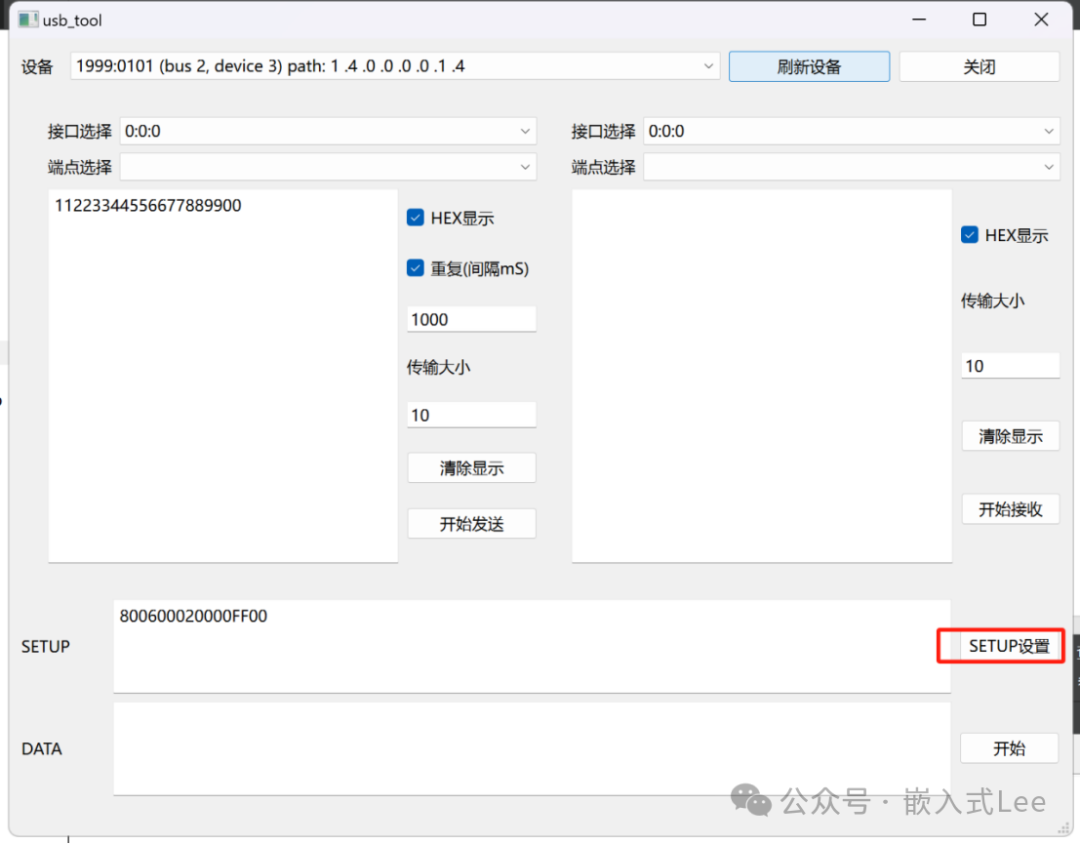
按setup設置,進入子窗口
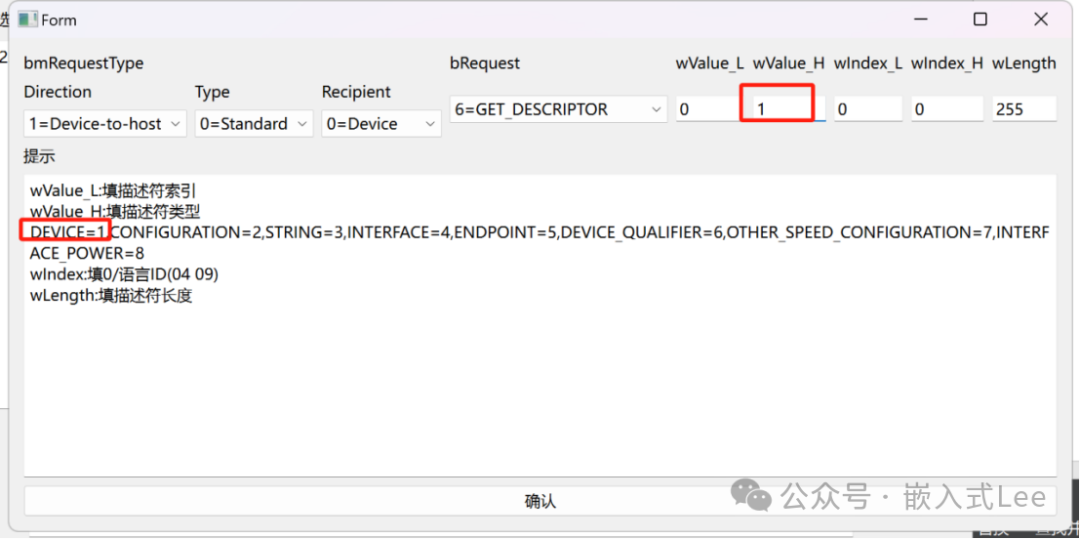
根據提示獲取設備描述符,再點擊確認
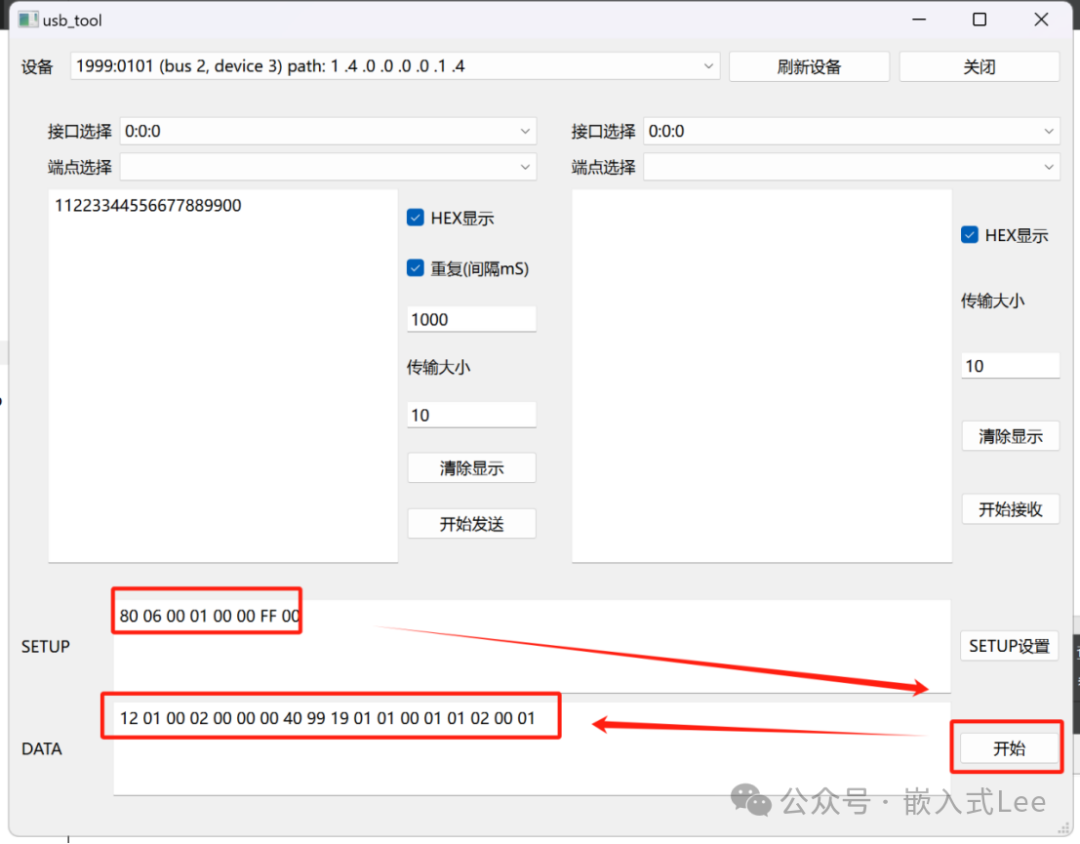
點擊開始獲取設備描述符
測試獲取配置描述符
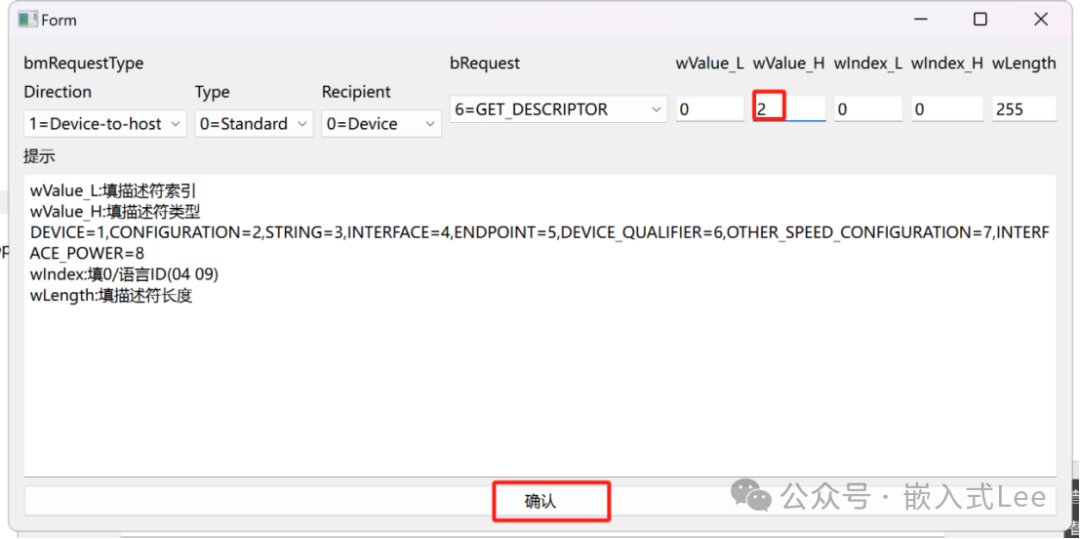
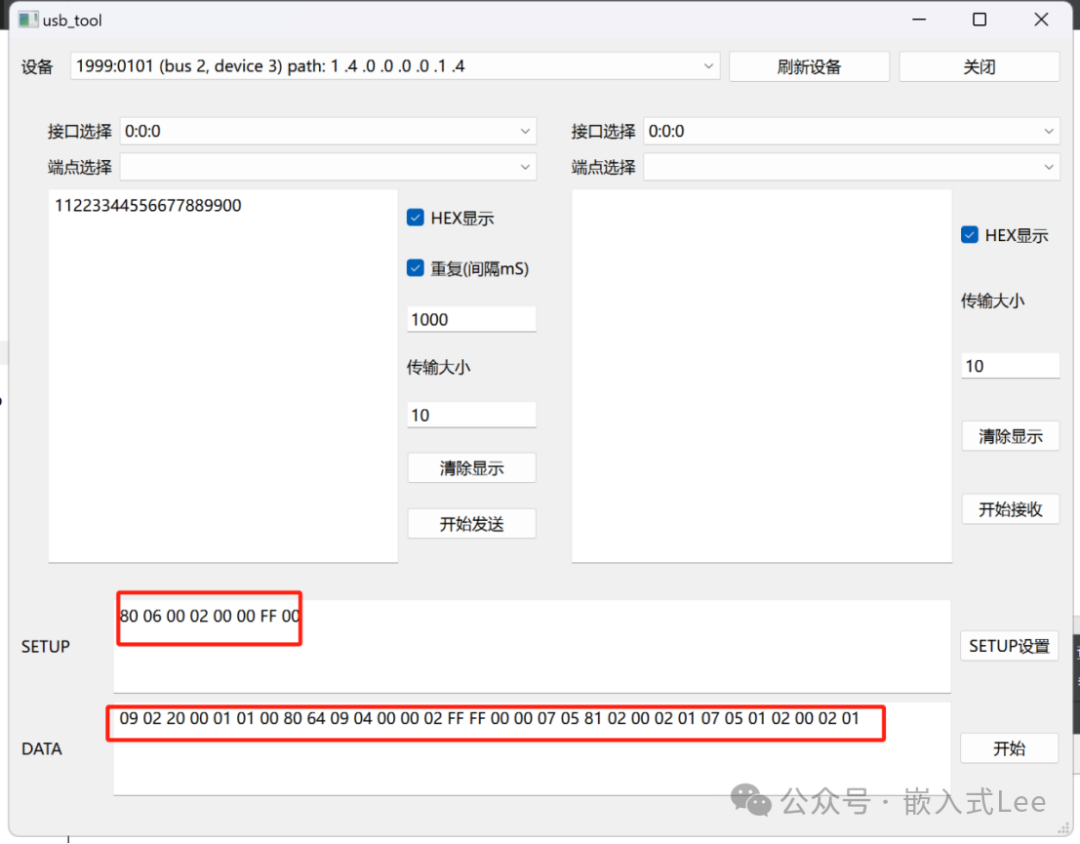
測試獲取字符串描述符
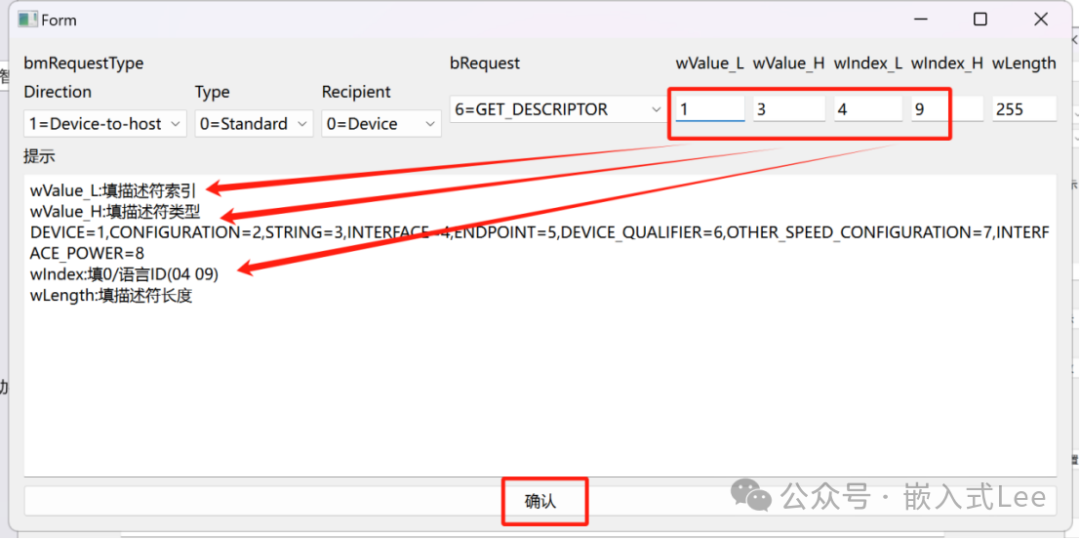
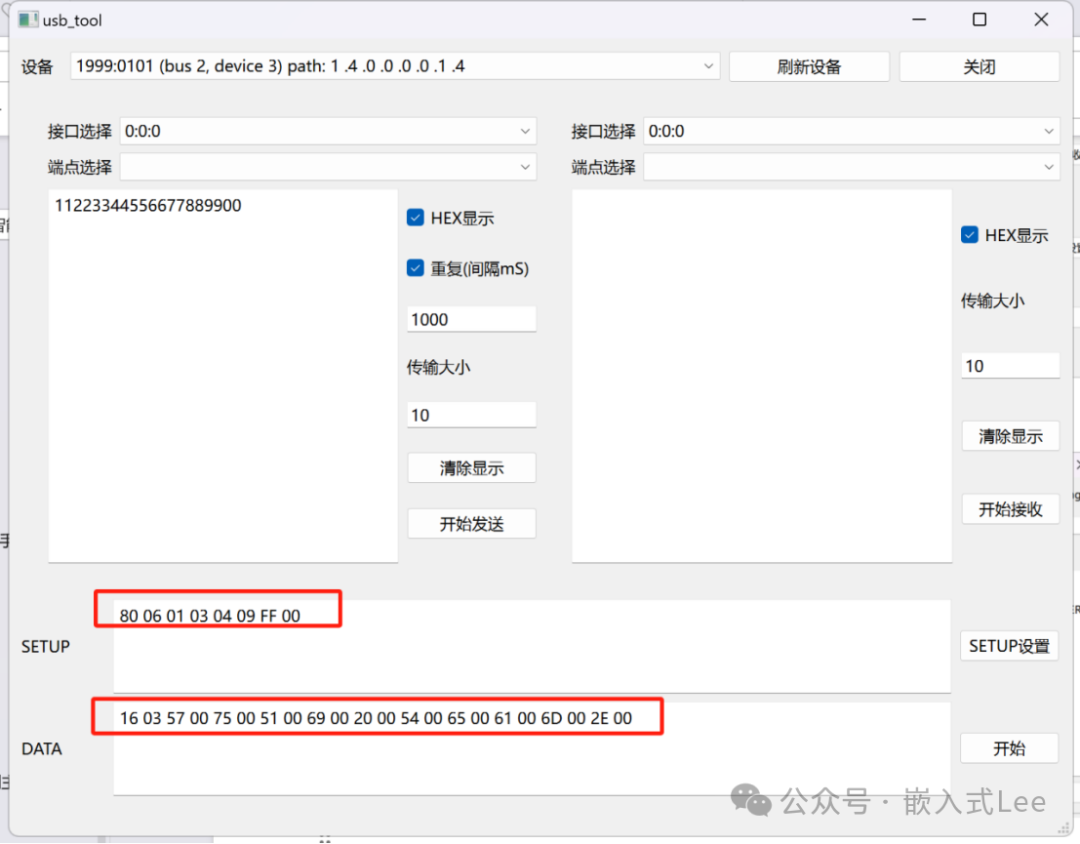
以上實現了標準請求的解析和提示,可以方便用戶使用進行測試控制傳輸的標準請求,后面還可以繼續完善除了標準請求的其他請求。


