
G2D模塊概述
作者@chhjnavy
原文:https://bbs.aw-ol.com/topic/3291/
G2D主要功能:
1)旋轉:支持90、180、270旋轉;
2)scale:放縮;
3)鏡像反轉:H / V;
4)透明疊加:實現兩個rgb圖片疊加;
5)格式轉換:yuv轉rgb等多種格式相互間轉換;
6)矩形填充,等諸多功能;

G2D配置
源碼目錄
tina-v853-docker/kernel/linux-4.9/drivers/char/sunxi_g2d
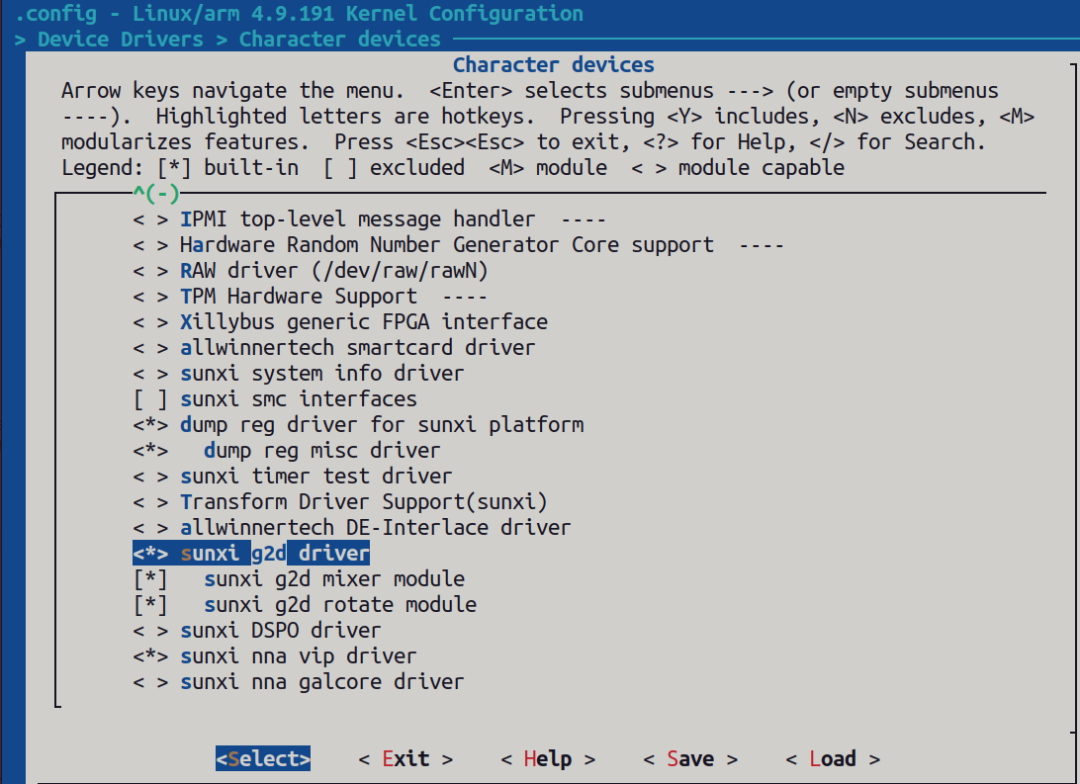
make kernel_menuconfig 配置
Device Drivers > Character devices > sunxi g2d driver
Device Tree 設備樹配置
sun8iw21p1.dtsi路徑:
tina-v853-docker/kernel/linux-4.9/arch/arm/boot/dts/sun8iw21p1.dtsi
?g2d: g2d@05410000 {? ? ?compatible = "allwinner,sunxi-g2d";? ? ?reg = <0x0 0x05410000 0x0 0xbffff>;? ? ?interrupts =89 IRQ_TYPE_LEVEL_HIGH>;? ? ?clocks = <&clk_g2d>;? ? ?iommus = <&mmu_aw 3 1>;? ? ?status = "okay";? ?};
注:status 要設定為“okay” 狀態。
重新編譯內核
使用燒錄工具PhoenixSuit 將編譯打包好的img鏡像燒錄到開發板。
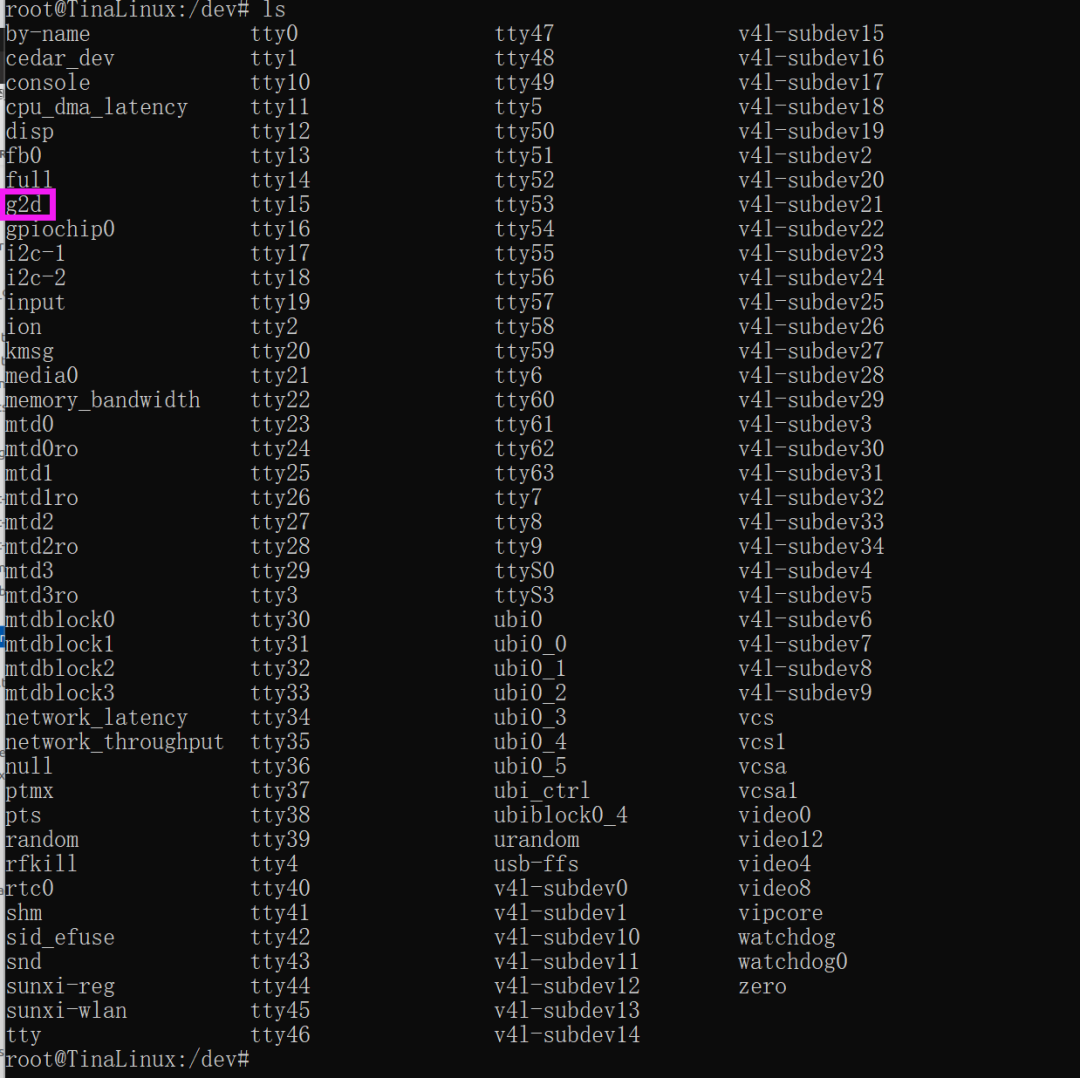
adb shell 打開控制終端查看設備節點G2D:
通過G2D設備節點進行操作
static int SampleG2d_G2dOpen(SAMPLE_G2D_CTX *p_g2d_ctx){? ?int ret = 0;? ?p_g2d_ctx->mG2dFd = open("/dev/g2d", O_RDWR, 0);? ?if (p_g2d_ctx->mG2dFd < 0)? ?{? ? ? ?aloge("fatal error! open /dev/g2d failed");? ? ? ?ret = -1;? ?}? ?return ret;}
G2D sample具體應用
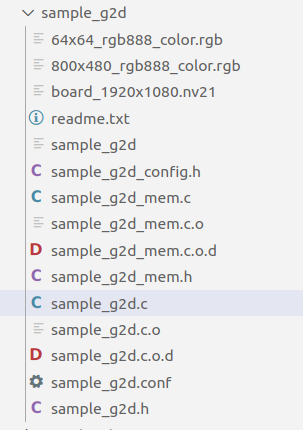
G2D sample目錄
進行rotation,scale,格式轉換
具體實現:將 nv21 格式的1920x1080圖轉換成rgb888 格式并放縮為640x360 大小。具體用到兩個功能,格式轉換和放縮。
首先根據1920x1080 nv21 格式以及 640x360 rgb888 格式申請虛擬地址空間以及轉換成物理地址(注意:g2d 轉換是在物理地址中完成的)
1920x1080 nv21 格式空間大小(輸入文件):
Y 占 19201080 = 2073600 字節
UV 占 19201080 / 2 = 1036800 字節

640x360 rgb888 格式空間大小(輸出文件):
RGB 占 6403603 = 691200 字節
另外:虛擬地址轉換成物理地址使用如下函數:
g2d_getPhyAddrByVirAddr()申請虛擬空間并轉換成物理空間完整函數如下:
static int PrepareFrmBuff(SAMPLE_G2D_CTX *p_g2d_ctx){? ?SampleG2dConfig *pConfig = NULL;? ?unsigned int size = 0;? ?pConfig = &p_g2d_ctx->mConfigPara;? ?? ?p_g2d_ctx->src_frm_info.frm_width = pConfig->mSrcWidth;? ?p_g2d_ctx->src_frm_info.frm_height = ?pConfig->mSrcHeight;? ?p_g2d_ctx->dst_frm_info.frm_width = pConfig->mDstWidth;? ?p_g2d_ctx->dst_frm_info.frm_height = pConfig->mDstHeight;? ?size = ALIGN(p_g2d_ctx->src_frm_info.frm_width, 16)*ALIGN(p_g2d_ctx->src_frm_info.frm_height, 16);? ?if(pConfig->mPicFormat == MM_PIXEL_FORMAT_YVU_SEMIPLANAR_420 || pConfig->mPicFormat == MM_PIXEL_FORMAT_YUV_SEMIPLANAR_420)? ?{? ? ? ?p_g2d_ctx->src_frm_info.p_vir_addr[0] = (void *)g2d_allocMem(size);? ? ? ?if(NULL == p_g2d_ctx->src_frm_info.p_vir_addr[0])? ? ? ?{? ? ? ? ? ?aloge("malloc_src_frm_y_mem_failed");? ? ? ? ? ?return -1;? ? ? ?}? ? ? ?p_g2d_ctx->src_frm_info.p_vir_addr[1] = (void *)g2d_allocMem(size/2);? ? ? ?if(NULL == p_g2d_ctx->src_frm_info.p_vir_addr[1])? ? ? ?{? ? ? ? ? ?g2d_freeMem(p_g2d_ctx->src_frm_info.p_vir_addr[0]);? ? ? ? ? ?aloge("malloc_src_frm_c_mem_failed"); ? ?? ? ? ? ? ?return -1;? ? ? ?}? ? ? ?p_g2d_ctx->src_frm_info.p_phy_addr[0] = (void *)g2d_getPhyAddrByVirAddr(p_g2d_ctx->src_frm_info.p_vir_addr[0]);? ? ? ?p_g2d_ctx->src_frm_info.p_phy_addr[1] = (void *)g2d_getPhyAddrByVirAddr(p_g2d_ctx->src_frm_info.p_vir_addr[1]);? ?}?if(pConfig->mDstPicFormat == MM_PIXEL_FORMAT_RGB_888)?{? ?size = p_g2d_ctx->dst_frm_info.frm_width * p_g2d_ctx->dst_frm_info.frm_height * 3;? ?p_g2d_ctx->dst_frm_info.p_vir_addr[0] = (void *)g2d_allocMem(size);? ?if(NULL == p_g2d_ctx->dst_frm_info.p_vir_addr[0])? ?{? ? ?if(p_g2d_ctx->src_frm_info.p_vir_addr[0] != NULL)? ? ?{? ? ? ?g2d_freeMem(p_g2d_ctx->src_frm_info.p_vir_addr[0]);? ? ?}? ? ?if(p_g2d_ctx->src_frm_info.p_vir_addr[1] != NULL)? ? ?{? ? ? ?g2d_freeMem(p_g2d_ctx->src_frm_info.p_vir_addr[1]);? ? ?}? ? ?aloge("malloc_dst_frm_y_mem_failed");? ? ?return -1;? ?}? ?p_g2d_ctx->dst_frm_info.p_phy_addr[0] = (void *)g2d_getPhyAddrByVirAddr(p_g2d_ctx->dst_frm_info.p_vir_addr[0]);?}? ?return 0;}
通過fopen 傳菜間兩個文件句柄,fd_in fd_out 用來操作輸入輸出兩個文件資源。
? ? ? ?p_g2d_ctx->fd_in = fopen(p_g2d_ctx->mConfigPara.SrcFile,"r");? ? ? ?if(NULL == p_g2d_ctx->fd_in)? ? ? ?{? ? ? ? ? ?aloge("open src file failed");? ? ? ? ? ?ret = -1;? ? ? ? ? ?goto _err2;? ? ? ?}? ? ? ?fseek(p_g2d_ctx->fd_in, 0, SEEK_SET);? ? ? ? ? ?p_g2d_ctx->fd_out = fopen(p_g2d_ctx->mConfigPara.DstFile, "wb");? ? ? ? ? ?if (NULL == p_g2d_ctx->fd_out)? ? ? ? ? ?{? ? ? ? ? ? ? ?aloge("open out file failed");? ? ? ? ? ? ? ?ret = -1;? ? ? ? ? ? ? ?goto _err2;? ? ? ? ? ?}? ? ? ? ? ?fseek(p_g2d_ctx->fd_out, 0, SEEK_SET);
讀出 1920x1080 nv21 圖資放入 虛擬空間
read_len = p_g2d_ctx->src_frm_info.frm_width * p_g2d_ctx->src_frm_info.frm_height;? ? ? ?if(pConfig->mPicFormat == MM_PIXEL_FORMAT_YVU_SEMIPLANAR_420|| pConfig->mPicFormat == MM_PIXEL_FORMAT_YUV_SEMIPLANAR_420)? ? ? ?{? ? ? ? ? ?size1 = fread(p_g2d_ctx->src_frm_info.p_vir_addr[0] , 1, read_len, p_g2d_ctx->fd_in);? ? ? ? ? ?if(size1 != read_len)? ? ? ? ? ?{? ? ? ? ? ? ? ?aloge("read_y_data_frm_src_file_invalid");? ? ? ? ? ?}? ? ? ? ? ?size2 = fread(p_g2d_ctx->src_frm_info.p_vir_addr[1], 1, read_len /2, p_g2d_ctx->fd_in);? ? ? ? ? ?if(size2 != read_len/2)? ? ? ? ? ?{? ? ? ? ? ? ? ?aloge("read_c_data_frm_src_file_invalid");? ? ? ? ? ?}? ? ? ? ? ?fclose(p_g2d_ctx->fd_in);? ? ? ? ? ?g2d_flushCache((void *)p_g2d_ctx->src_frm_info.p_vir_addr[0], read_len);? ? ? ? ? ?g2d_flushCache((void *)p_g2d_ctx->src_frm_info.p_vir_addr[1], read_len/2);? ? ? ?}
打開g2d 初始化,并開始轉換
ret = SampleG2d_G2dOpen(p_g2d_ctx);? ?if (ret < 0)? ?{? ? ? ?aloge("fatal error! open /dev/g2d fail!");? ? ? ?goto _err2;? ?}? ?ret = SampleG2d_G2dConvert(p_g2d_ctx);? ?if (ret < 0)? ?{? ? ? ?aloge("fatal error! g2d convert fail!");? ? ? ?goto _close_g2d;? ?}//具體轉化函數:static int SampleG2d_G2dConvert_scale(SAMPLE_G2D_CTX *p_g2d_ctx){? ?int ret = 0;? ?g2d_blt_h blit;? ?g2d_fmt_enh eSrcFormat, eDstFormat;? ?SampleG2dConfig *pConfig = NULL;? ?pConfig = &p_g2d_ctx->mConfigPara;? ?ret = convert_PIXEL_FORMAT_E_to_g2d_fmt_enh(pConfig->mPicFormat, &eSrcFormat);? ?if(ret!=SUCCESS)? ?{? ? ? ?aloge("fatal error! src pixel format[0x%x] is invalid!", pConfig->mPicFormat);? ? ? ?return -1;? ?}? ?ret = convert_PIXEL_FORMAT_E_to_g2d_fmt_enh(pConfig->mDstPicFormat, &eDstFormat);? ?if(ret!=SUCCESS)? ?{? ? ? ?aloge("fatal error! dst pixel format[0x%x] is invalid!", pConfig->mPicFormat);? ? ? ?return -1;? ?}? ?//config blit? ?memset(&blit, 0, sizeof(g2d_blt_h));? ?if(0 != pConfig->mDstRotate)? ?{? ? ? ?aloge("fatal_err: rotation can't be performed when do scaling");? ?}? ?blit.flag_h = G2D_BLT_NONE_H; ? ? ? // angle rotation used// ? ?switch(pConfig->mDstRotate)// ? ?{// ? ? ? ?case 0:// ? ? ? ? ? ?blit.flag_h = G2D_BLT_NONE_H; ? //G2D_ROT_0, G2D_BLT_NONE_H// ? ? ? ? ? ?break;// ? ? ? ?case 90:// ? ? ? ? ? ?blit.flag_h = G2D_ROT_90;// ? ? ? ? ? ?break;// ? ? ? ?case 180:// ? ? ? ? ? ?blit.flag_h = G2D_ROT_180;// ? ? ? ? ? ?break;// ? ? ? ?case 270:// ? ? ? ? ? ?blit.flag_h = G2D_ROT_270;// ? ? ? ? ? ?break;// ? ? ? ?default:// ? ? ? ? ? ?aloge("fatal error! rotation[%d] is invalid!", pConfig->mDstRotate);// ? ? ? ? ? ?blit.flag_h = G2D_BLT_NONE_H;// ? ? ? ? ? ?break;// ? ?}? ?//blit.src_image_h.bbuff = 1;? ?//blit.src_image_h.color = 0xff;? ?blit.src_image_h.format = eSrcFormat;? ?blit.src_image_h.laddr[0] = (unsigned int)p_g2d_ctx->src_frm_info.p_phy_addr[0];? ?blit.src_image_h.laddr[1] = (unsigned int)p_g2d_ctx->src_frm_info.p_phy_addr[1];? ?blit.src_image_h.laddr[2] = (unsigned int)p_g2d_ctx->src_frm_info.p_phy_addr[2];? ?//blit.src_image_h.haddr[] =? ?blit.src_image_h.width = p_g2d_ctx->src_frm_info.frm_width;? ?blit.src_image_h.height = p_g2d_ctx->src_frm_info.frm_height;? ?blit.src_image_h.align[0] = 0;? ?blit.src_image_h.align[1] = 0;? ?blit.src_image_h.align[2] = 0;? ?blit.src_image_h.clip_rect.x = pConfig->mSrcRectX;? ?blit.src_image_h.clip_rect.y = pConfig->mSrcRectY;? ?blit.src_image_h.clip_rect.w = pConfig->mSrcRectW;? ?blit.src_image_h.clip_rect.h = pConfig->mSrcRectH;? ?blit.src_image_h.gamut = G2D_BT601;? ?blit.src_image_h.bpremul = 0;? ?//blit.src_image_h.alpha = 0xff;? ?blit.src_image_h.mode = G2D_PIXEL_ALPHA; ? //G2D_PIXEL_ALPHA, G2D_GLOBAL_ALPHA? ?blit.src_image_h.fd = -1;? ?blit.src_image_h.use_phy_addr = 1;? ?//blit.dst_image_h.bbuff = 1;? ?//blit.dst_image_h.color = 0xff;? ?blit.dst_image_h.format = eDstFormat;? ?blit.dst_image_h.laddr[0] = (unsigned int)p_g2d_ctx->dst_frm_info.p_phy_addr[0];? ?blit.dst_image_h.laddr[1] = (unsigned int)p_g2d_ctx->dst_frm_info.p_phy_addr[1];? ?blit.dst_image_h.laddr[2] = (unsigned int)p_g2d_ctx->dst_frm_info.p_phy_addr[2];? ?//blit.dst_image_h.haddr[] =? ?blit.dst_image_h.width = p_g2d_ctx->dst_frm_info.frm_width;? ?blit.dst_image_h.height = p_g2d_ctx->dst_frm_info.frm_height;? ?blit.dst_image_h.align[0] = 0;? ?blit.dst_image_h.align[1] = 0;? ?blit.dst_image_h.align[2] = 0;? ?blit.dst_image_h.clip_rect.x = pConfig->mDstRectX;? ?blit.dst_image_h.clip_rect.y = pConfig->mDstRectY;? ?blit.dst_image_h.clip_rect.w = pConfig->mDstRectW;? ?blit.dst_image_h.clip_rect.h = pConfig->mDstRectH;? ?blit.dst_image_h.gamut = G2D_BT601;? ?blit.dst_image_h.bpremul = 0;? ?//blit.dst_image_h.alpha = 0xff;? ?blit.dst_image_h.mode = G2D_PIXEL_ALPHA; ? //G2D_PIXEL_ALPHA, G2D_GLOBAL_ALPHA? ?blit.dst_image_h.fd = -1;? ?blit.dst_image_h.use_phy_addr = 1;? ?ret = ioctl(p_g2d_ctx->mG2dFd, G2D_CMD_BITBLT_H, (unsigned long)&blit);? ?if(ret < 0)? ?{? ? ? ?aloge("fatal error! bit-block(image) transfer failed[%d]", ret);? ? ? ?system("cd /sys/class/sunxi_dump;echo 0x14A8000,0x14A8100 > dump;cat dump");? ?}? ?return ret;}
轉化完成后將640x360 rgb888 圖資通過fd_out句柄存儲起來
if(pConfig->mDstPicFormat == MM_PIXEL_FORMAT_RGB_888)? ? ? ?{? ? ? ? ? ?out_len = p_g2d_ctx->dst_frm_info.frm_width * p_g2d_ctx->dst_frm_info.frm_height *3;? ? ? ? ? ?g2d_flushCache((void *)p_g2d_ctx->dst_frm_info.p_vir_addr[0], out_len);? ? ? ? ? ?fwrite(p_g2d_ctx->dst_frm_info.p_vir_addr[0], 1, out_len, p_g2d_ctx->fd_out);? ? ? ?}
轉化步驟總結
通過步驟3中的模塊化分析,可以看出g2d 轉化大概分為一下步驟:
為打開 iomen 初始化;
為src以及dst圖資申請虛擬地址空間并轉換成物理地址空間;
將src圖資放入虛擬地址空間,然后自動映射到物理地址空間;
打開g2d 設備節點進行轉換(最重要的一環,可以通過手冊分析具體怎么轉換的);
將轉換好的dst圖資保存起來;
-End-
本文轉載自:https://bbs.aw-ol.com/topic/3291/