
嵌入式開發(fā)中GDB進行調(diào)試是必備手段,GDB擁有強大的腳本集成能力,尤其是支持Python腳本,可以使用Python 擴展GDB。注意:GDB構(gòu)建時需要配置--with-python選項才會支持Python腳本,一般使用現(xiàn)成的二進制GDB工具, 這個選項是會配置的。
利用腳本我們能實現(xiàn)自動化測試,提高調(diào)試效率等。這里就來分享在GDB調(diào)試中Python腳本的使用,分享一些實例,更多信息可以直接參考GDB的文檔。
以下介紹GDB中Python的一些基礎(chǔ)內(nèi)容。
GDB環(huán)境中,輸入help python 顯示如下
(gdb) help pythonpython, pyEvaluate a Python command.The command can be given as an argument, for instance:python print (23)If no argument is given, the following lines are read and usedas the Python commands. Type a line containing "end" to indicatethe end of the command.(gdb)
輸入python help (gdb)可以查看Python API幫助
(gdb) python help (gdb)Help on package gdb:NAMEgdb - # Copyright (C) 2010-2020 Free Software Foundation, Inc.PACKAGE CONTENTSFrameDecoratorFrameIteratorcommand (package)framesfunction (package)printer (package)printingprompttypesunwinderxmethodSUBMODULESevents
GDB有時會讀取輔助數(shù)據(jù)文件。這些文件存儲在稱為數(shù)據(jù)目錄data directory的目錄中。
這個目錄可以通過GDB環(huán)境的show data-directory命令查看,通過set data-directory directory命令設(shè)置
例如
(gdb) show data-directoryGDB's data directory is ".../directory /opt/riscv-toolchain/10.2.0/share/gdb".(gdb) set data-directory /opt/riscv-toolchain/10.2.0/share/gdb(gdb)
也可以在執(zhí)行GDB時指定--data-directory選項, 例如
riscv64-unknown-elf-gdb --data-directory=/opt/riscv-toolchain/10Quit/share/gdb而該目錄的默認配置是在構(gòu)建配置時的--with-gdb-datadir選項指定的, 如果指定為‘--prefix’ 或‘--exec-prefix’對應(yīng)的二進制文件目錄, 則該目錄會隨著GDB的安裝路徑自動變化。
Python腳本的牧人搜索路徑就是上述
Data directory下的python
比如我這里的
root@qinyunti:~/# ls /opt/riscv-toolchain/10.2.0/share/gdbpython syscalls system-gdbinitroot@qinyunti:~/# ls /opt/riscv-toolchain/10.2.0/share/gdb/python/gdb/FrameDecorator.py __init__.py command function printing.py types.py xmethod.pyFrameIterator.py __pycache__ frames.py printer prompt.py unwinder.pyroot@qinyunti:~/#
注意上述的兩個子目錄command function
data-directory/python/gdb/command 或 data-directory/python/gdb/function中的命令或者函數(shù)會自動在GDB啟動時導入。
root@qinyunti:~/# ls /opt/riscv-toolchain/10.2.0/share/gdb/python/gdb/command/__init__.py __pycache__ explore.py frame_filters.py pretty_printers.py prompt.py type_printers.py unwinders.py xmethods.pyroot@qinyunti:~/# ls /opt/riscv-toolchain/10.2.0/share/gdb/python/gdb/function/__init__.py __pycache__ as_string.py caller_is.py strfns.pyroot@qinyunti:~/#
直接GDB命令行中輸入腳本
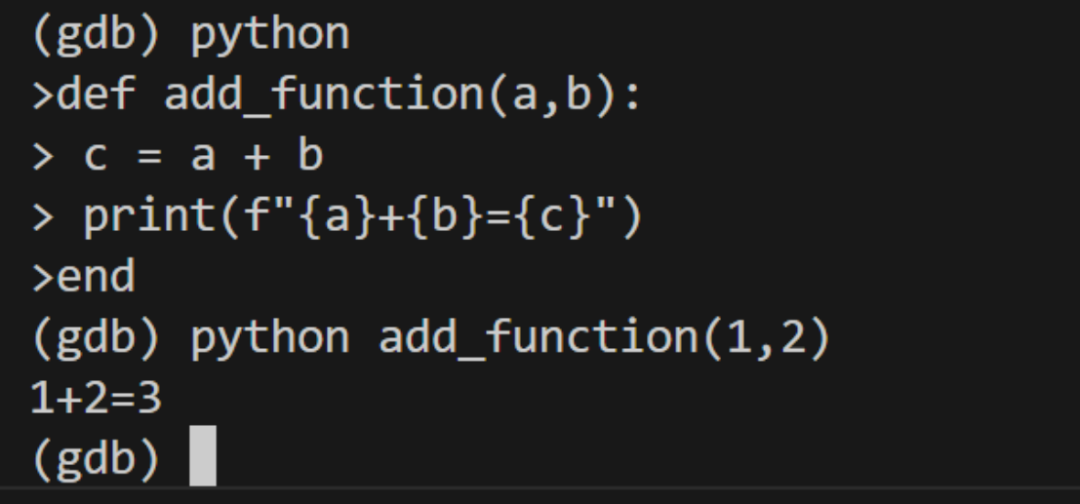
GDB中輸入python回車進入python命令行交互環(huán)境
輸入腳本,最后以end結(jié)束, 例如
定義函數(shù)add_function(a,b), 然后python add_function(1,2)調(diào)用執(zhí)行
(gdb) python>def add_function(a,b):> c = a + b> print(f"{a}+{b}={c}")>end(gdb) python add_function(1,2)1+2=3(gdb)
新建add.py輸入以下內(nèi)容
def add_function(a,b):c = a + bprint(f"{a}+{b}={c}")
導入腳本source add.py
執(zhí)行腳本python add_function(2,3)
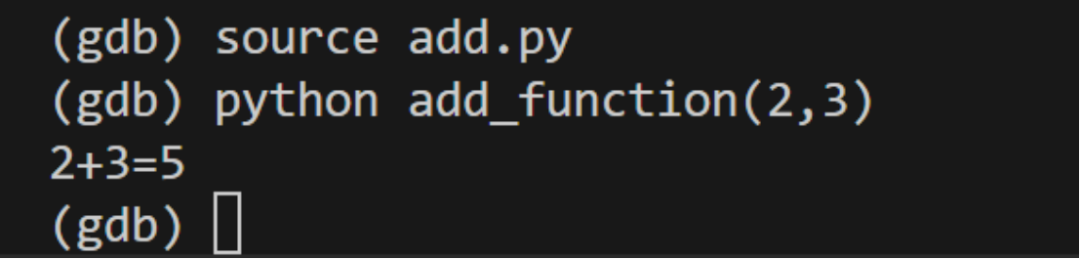
data-directory/python/gdb/command 或 data-directory/python/gdb/function中的會自動導入無需source手動導入。
GDB自帶多個模塊來輔助編寫Python代碼。
? gdb.printing: 構(gòu)建和注冊美觀打印。
? gdb.types: 用于處理類型的工具。
? gdb.prompt: 用于快速值替代的實用工具。
? gdb.ptwrite: PTWRITE濾波器注冊工具。
詳見
https://sourceware.org/gdb/current/onlinedocs/gdb.html/Python-modules.html#Python-modules詳見
https://sourceware.org/gdb/current/onlinedocs/gdb.html/Python-API.html#Python-API更多內(nèi)容可以參考GDB的在線文檔
https://sourceware.org/gdb/current/onlinedocs/gdb.html/Python-API.html#Python-API 在調(diào)試時,有一種比較常見的需求,希望能在某個函數(shù)返回某個值時暫停,以查看當時狀態(tài),手動的方式是在函數(shù)返回處打斷點,然后不斷c, 并打印返回值,這樣比較繁瑣,尤其是在函數(shù)頻繁調(diào)用且很小概率返回需要的值時。 此時就可以使用Python腳本來實現(xiàn),返回特定值后自動暫停。
創(chuàng)建test.py
import gdbclass FunctionFinishBreakpoint (gdb.FinishBreakpoint):def __init__ (self):gdb.FinishBreakpoint.__init__(self, gdb.newest_frame(),internal=True)self.silent = Truedef stop(self):print("after: {}".format(self.return_value))return self.return_value == 5class FunctionBreakpoint(gdb.Breakpoint):def __init__ (self, spec):gdb.Breakpoint.__init__(self, spec)self.silent = Truedef stop (self):print("before")FunctionFinishBreakpoint() # set breakpoint on function returnreturn False # do not stop at function entryFunctionBreakpoint("test")
source test.py時自動執(zhí)行
FunctionBreakpoint("test") test為需要監(jiān)控的函數(shù)名字
FunctionBreakpoint("test")的作用是每次在test執(zhí)行時回調(diào)FunctionBreakpoint.stop且回調(diào)是silent的,此時調(diào)用FunctionFinishBreakpoint()
而FunctionFinishBreakpoint.stop在其stop函數(shù)返回False時不暫停,返回True時暫停。
所以 return not self.return_value表示返回0時暫停。
Breakpoint參考https://sourceware.org/gdb/current/onlinedocs/gdb.html/Breakpoints-In-Python.html#Breakpoints-In-PythonFinishBreakpoint參考https://sourceware.org/gdb/current/onlinedocs/gdb.html/Finish-Breakpoints-in-Python.html#Finish-Breakpoints-in-Python
測試代碼
static __attribute__((optimize("O0"))) int test(int i){return i;}for(int i=0;i<10;i++){int res = test(i);char buf[16];itoa(buf, res);uart_put_string(buf);}
看到source test.py后打印如下
(gdb) source test.pyBreakpoint 1 at 0x1000ba: file main.c, line 89.(gdb) cContinuing.beforeafter: 0beforeafter: 1beforeafter: 2beforeafter: 3beforeafter: 4beforeafter: 5(gdb) p i$1 = 5(gdb)
可以看到返回5時就暫停了,此時查看i也是5
使用Python 擴展 GDB可以方便自動化測試,提高調(diào)試效率,以上僅做簡單介紹, 分享了一個簡單的實例。平時可以多積累一些實例腳本,以便不時之需。 更詳細的Python腳本語法等可參考GDB的文檔。

