
為了達到目標,需要完成以下工作:
為了將gb2312.bin燒錄到ESP32中,需要為gb2312.bin分配一個分區(qū),在燒錄的時候和固件一起燒錄到ESP32中:
idf.py menuconfig
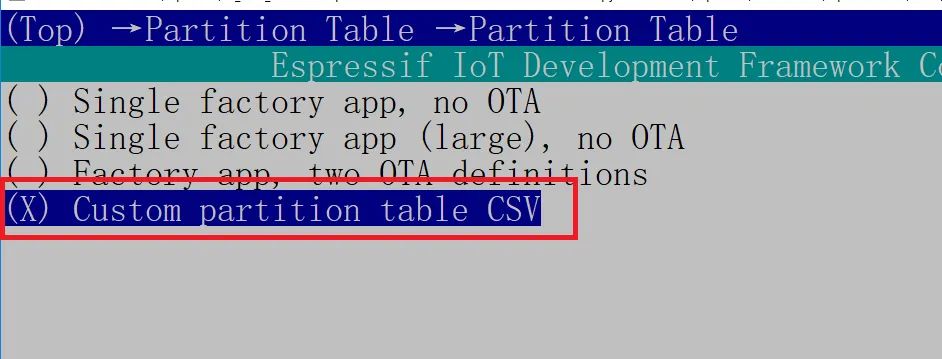
Partition Table選擇"Custom partition table CSV"
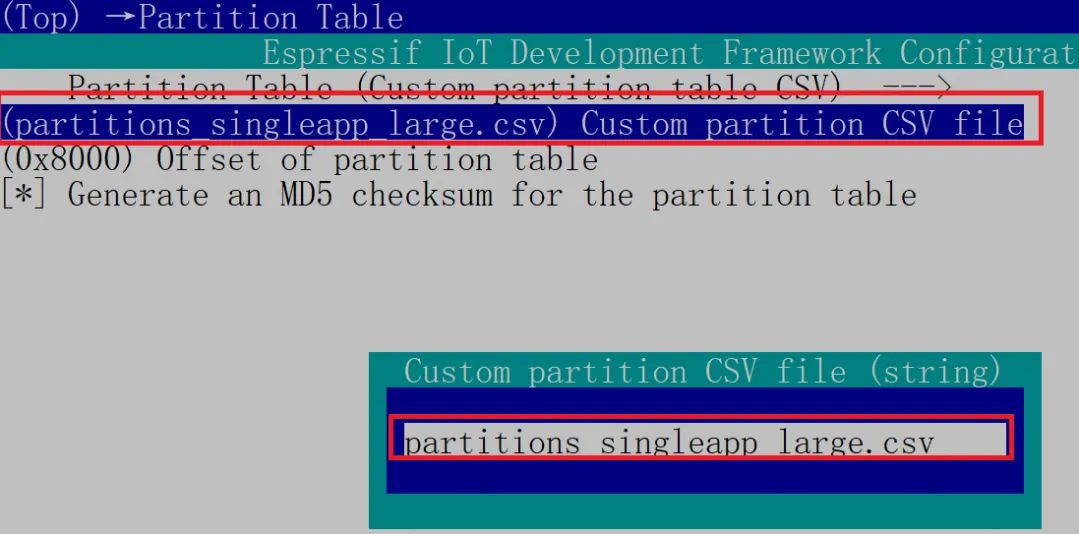
設置Custom partition table CSV名稱:
partitions_singleapp_large.csv內(nèi)容:
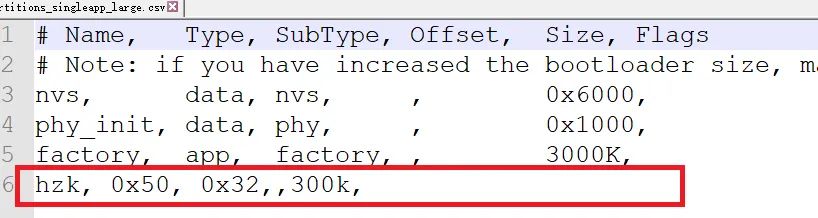
hzk是用于放漢字庫的分區(qū),0x50,0x32是自定義的類型和子類型用于和其他分區(qū)區(qū)別便于查找,300k為分區(qū)大小,漢字庫200多k,大小足夠了。
3、燒錄命令和燒錄地址
nvs,data,nvs,0x9000,24K,phy_init,data,phy,0xf000,4K,factory,app,factory,0x10000,3000K,hzk,80,50,0x2fe000,300K,
其中,0x2fe000是燒錄hzk的燒錄地址。
編譯后給出的燒錄命令:
C:\Espressif\python_env\idf5.1_py3.11_env\Scripts\python.exe C:\Espressif\frameworks\esp-idf-v5.1.2\components\esptool_py\esptool\esptool.py -p (PORT) -b?460800?--before default_reset --after hard_reset --chip esp32 ?write_flash --flash_mode dio --flash_size?4MB --flash_freq?40m?0x1000 build\bootloader\bootloader.bin?0x8000 build\partition_table\partition-table.bin?0x10000 build\a2dp-demo.binC:\Espressif\python_env\idf5.1_py3.11_env\Scripts\python.exe C:\Espressif\frameworks\esp-idf-v5.1.2\components\esptool_py\esptool\esptool.py -p COM10 -b?460800?--before default_reset --after hard_reset --chip esp32 ?write_flash --flash_mode dio --flash_size?4MB --flash_freq?40m?0x1000 build\bootloader\bootloader.bin?0x8000 build\partition_table\partition-table.bin?0x10000 build\a2dp-demo.bin?0x2fe000 gb2312_80.binCOM10酌情修改,gb2312_80.bin放到工程根目錄。
4、讀取漢字庫,并在LCD上顯示
esp_partition_read:Read data from the partition。從分區(qū)上讀取指定字節(jié)數(shù)據(jù)。
void?getHzkPartition(void){? ? hzkPartition=?esp_partition_find_first(0x50,0x32,"hzk");}
獲取字模數(shù)據(jù):
void?getMatrix(const?unsigned?short?nmCode){? ? ? ??uint32_t?offset;? ? ? ??unsigned?char?GBH,GBL;? ? ? ??unsigned?short?nm=nmCode;? ? ? ? GBH=nm>>8;? ? ? ? GBL=nm;? ? ? ??if(GBH>=0xb0)? ? ? ? {? ? ? ? ? ? ? ? offset=((GBH-0xa7)*94+GBL-0xa1)*32;? ? ? ? }else? ? ? ? {? ? ? ? ? ? ? ? offset=((GBH-0xa1)*94+GBL-0xa1)*32;? ? ? ? }? ??esp_partition_read(hzkPartition,offset,MatrixBuff,32);}
void?GUI_Write16CnCharMatrix(unsigned?char?x,?unsigned?char?y,?char?*cn,?unsigned?short?wordColor,?unsigned?short?backColor){? ??uint8_t?i=0, j,mx,my,wordByte;? ? ? ??uint16_t?zm;? ??uint16_t?color;? ??uint8_t?wordNum;? ? mx=x;? ?my=y;? ??while?(*cn !=?'\0')? ? {? ? ? ??if(mx>170){? ? ? ? ? ? mx=x;? ? ? ? ? ? my+=16;? ? ? ? ? ? ? ? }? ? ? ??if(*cn<128){? ? ? ? ? ? wordNum = *cn -?32;? ? ? ? ? ??setXY(mx,my,mx+7, my+15);? ? ? ? ? ??for?(wordByte=0; wordByte<16; wordByte++)? ? ? ? ? ? {? ? ? ? ? ? ? ? color = Font_Data[wordNum].dat[wordByte];? ? ? ? ? ? ? ??for?(j=0; j<8; j++)? ? ? ? ? ? ? ? {? ? ? ? ? ? ? ? ? ??if?((color&0x80) ==?0x80)? ? ? ? ? ? ? ? ? ? {? ? ? ? ? ? ? ? ? ? ? ??setPixel(wordColor);? ? ? ? ? ? ? ? ? ? }? ? ? ? ? ? ? ? ? ??else? ? ? ? ? ? ? ? ? ? {? ? ? ? ? ? ? ? ? ? ? ??setPixel(backColor);? ? ? ? ? ? ? ? ? ? }? ? ? ? ? ? ? ? ? ? color <<=?1;? ? ? ? ? ? ? ? }? ? ? ? ? ? }? ? ? ? ? ? cn++;? ? ? ? ? ? mx +=8;? ? ? ? ? ? }? ? ? ??else? ? ? ? {? ? ? ? ? ??setXY(mx, my, mx+15, my+15);? ? ? ? ? ? zm=*cn;? ? ? ? ? ? zm<<=8;? ? ? ? ? ? zm|=*(cn+1);? ? ? ? ? ??getMatrix(zm);? ? ? ? ? ??for(i=0; i<32; i++)? ? ? ? ? ? { ??//MSK的位數(shù)? ? ? ? ? ? ? ? color=MatrixBuff[i];? ? ? ? ? ? ? ??for(j=0;j<8;j++)? ? ? ? ? ? ? ? {? ? ? ? ? ? ? ? ? ??if((color&0x80)==0x80)? ? ? ? ? ? ? ? ? ? {? ? ? ? ? ? ? ? ? ? ? ??setPixel(wordColor);? ? ? ? ? ? ? ? ? ? }? ? ? ? ? ? ? ? ? ??else? ? ? ? ? ? ? ? ? ? {? ? ? ? ? ? ? ? ? ? ? ??setPixel(backColor);? ? ? ? ? ? ? ? ? ? }? ? ? ? ? ? ? ? ? ? color<<=1;? ? ? ? ? ? ? ? }//for(j=0;j<8;j++)結束? ? ? ? ? ? }? ? ? ? ? ? cn +=?2;? ? ? ? ? ? mx +=?16;? ? ? ? }? ? }}
可以顯示ASCII和漢字。
六、UTF轉GBK的函數(shù)
UTF漢字不能直接轉換為GBK,需要先將UTF轉換為unicode,再將unicode通過查表法轉換為GBK。
這部分不用自己實現(xiàn),網(wǎng)上有現(xiàn)成的:https://gitee.com/zhangkt1995/my-code/tree/master/utf8_gb2312_switch

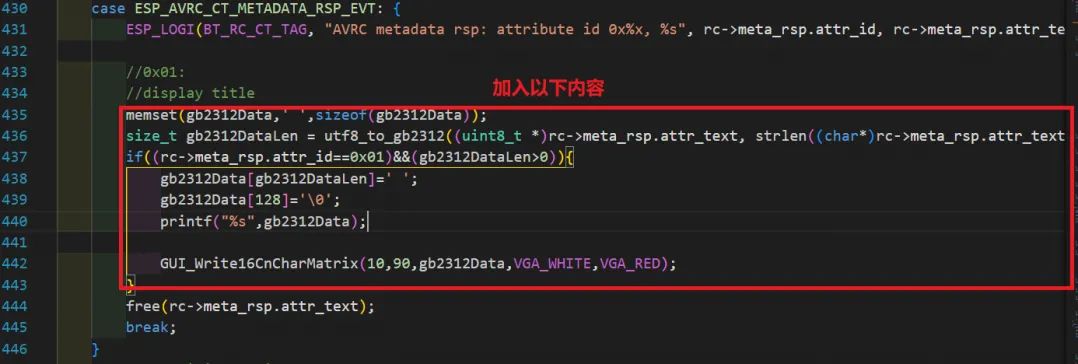
memset(gb2312Data,' ',sizeof(gb2312Data));? ? ? ??size_t?gb2312DataLen =?utf8_to_gb2312((uint8_t?*)rc->meta_rsp.attr_text,?strlen((char*)rc->meta_rsp.attr_text), (uint8_t?*)gb2312Data,?sizeof(gb2312Data));? ? ? ??if((rc->meta_rsp.attr_id==0x01)&&(gb2312DataLen>0)){? ? ? ? ? ? gb2312Data[gb2312DataLen]=' ';? ? ? ? ? ? gb2312Data[128]='\0';? ? ? ? ? ??printf("%s",gb2312Data);? ? ? ? ? ??GUI_Write16CnCharMatrix(10,90,gb2312Data,VGA_WHITE,VGA_RED);? ? ? ? }
當收到ESP_AVRC_CT_METADATA_RSP_EVT消息后,將收到的AVRCP協(xié)議數(shù)據(jù)顯示出來。
為什么要在這里添加?如果想深入了解,還是需要參考AVRCP協(xié)議相關內(nèi)容。rc->meta_rsp.attr_id==0x01,標識接收的是歌曲TITLE信息,同時歌詞也復用該字段。
通過utf8_to_gb2312將收到的歌詞,由UTF-8轉換為gb2312編碼。
通過GUI_Write16CnCharMatrix將歌詞顯示在LCD上。
八、運行效果
手機打開藍牙,連接ESP_SPEAKER。打開搜狗音樂,找一首歌播放。
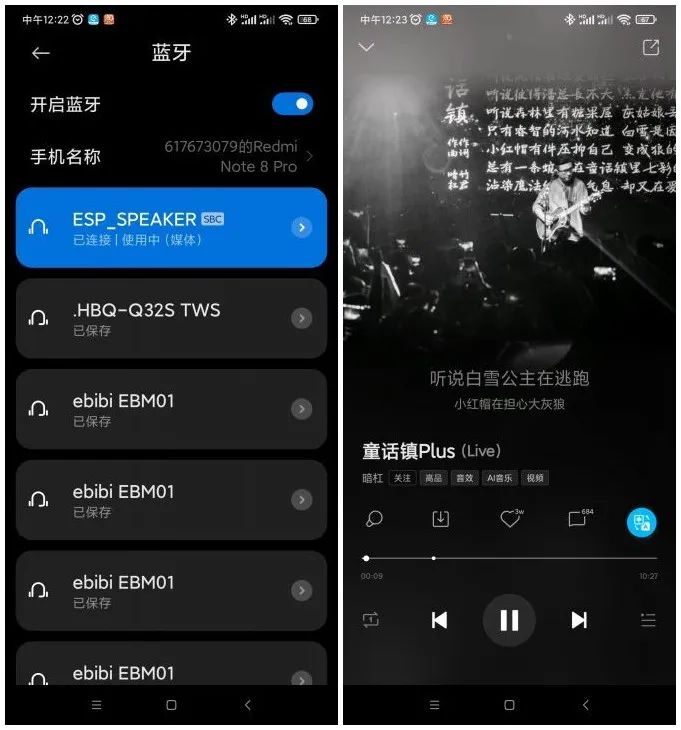
這時LCD上歌詞會實時顯示:
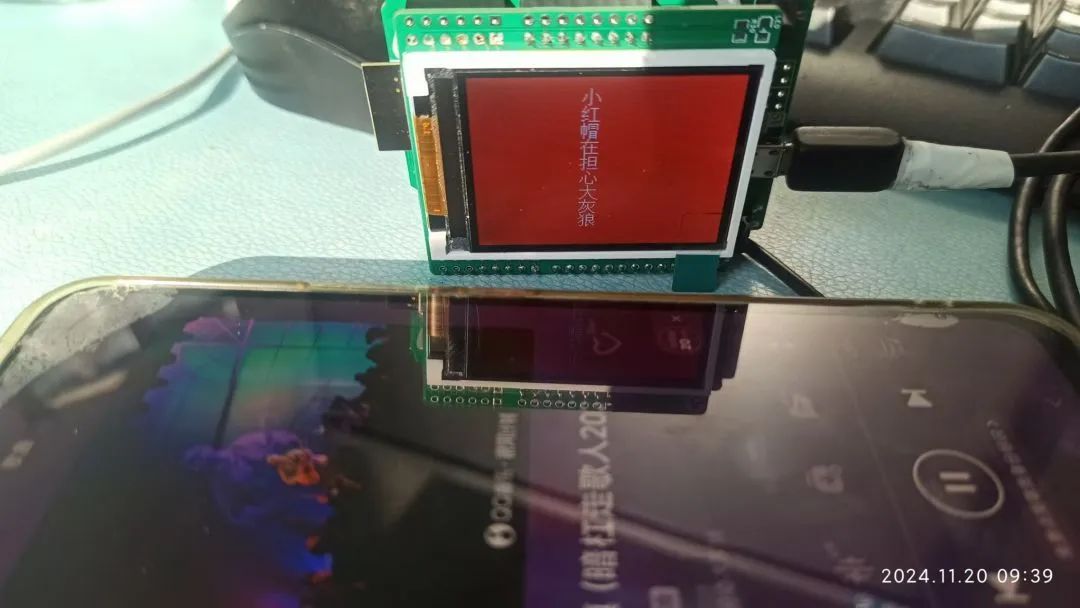
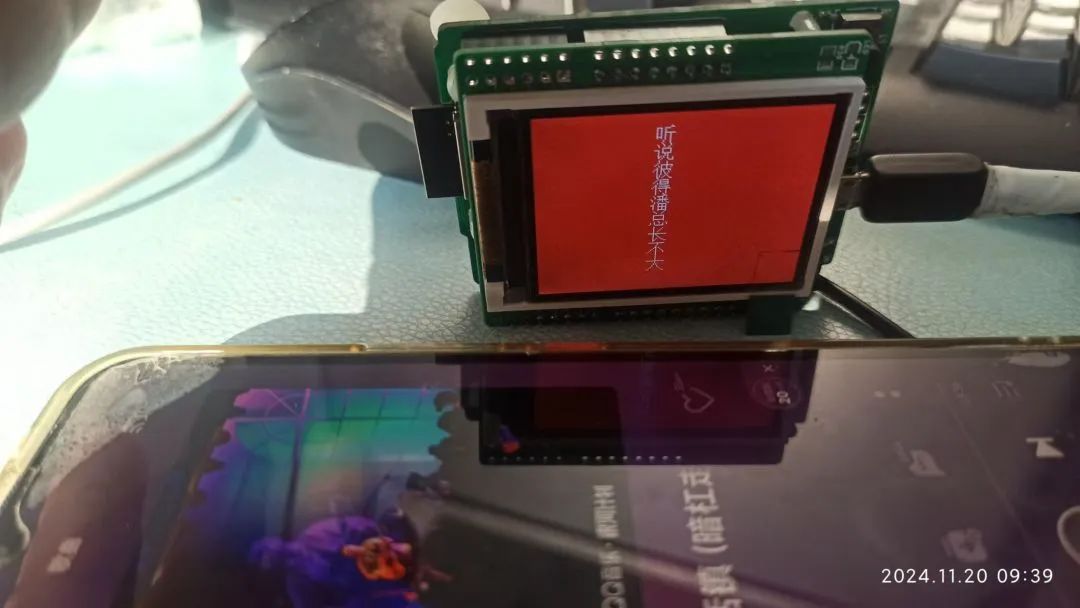
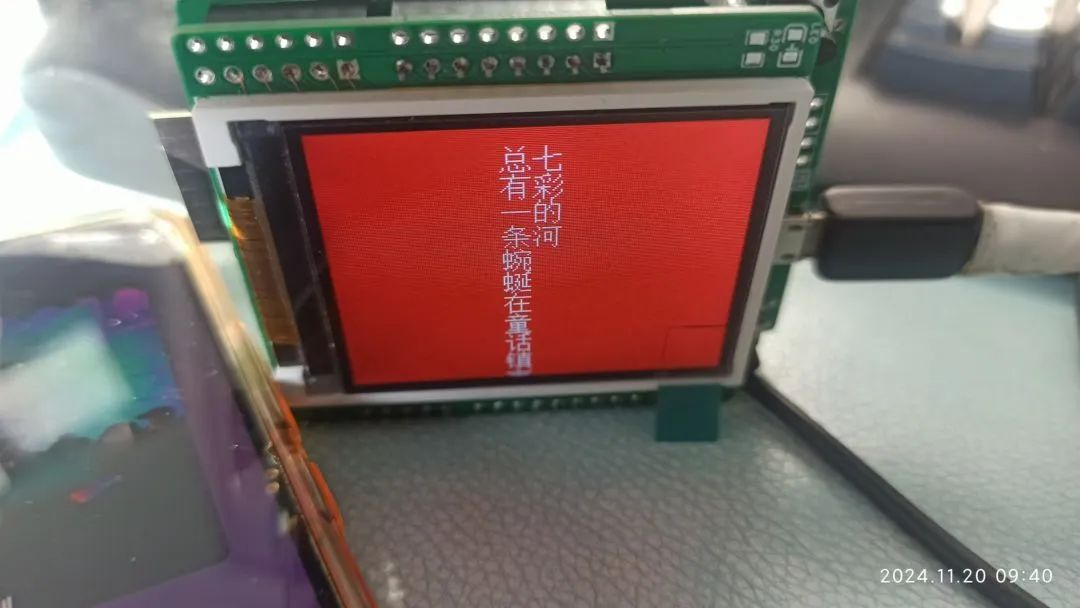
以上就是今天的分享,如果有需要查看原圖、代碼的小伙伴,請點擊底部“閱讀原文”進行下載。

END


